Proof of Delivery Extraction in 8 Seconds: Copyable Schema for Freight Ops
Practical implementation guide for freight teams: get a copyable field schema, pilot checklist, matching and exception routing patterns, plus Logentic's 8...

Proof of delivery extraction automatically converts signed delivery receipts, driver photos, and ePOD screens into structured records: recipient name, signature status, timestamps, and line items. That structured output feeds invoice matching, receiving controls, and claims workflows without a human retyping a single field. The payoff is speed. Freight audit teams close reconciliation cycles days faster, and controllers stop releasing payment on shipments that were never actually delivered intact.
TL;DR:
- Automated extraction processes delivery receipt data in seconds, eliminating manual typing that causes invoice delays and claim disputes.
- Core fields like shipment ID, delivery timestamp, recipient, and signature status are essential for accurate matching and verification workflows.
- Handling exceptions such as damage, refusal, or illegible signatures requires specialized classification and routing to prevent bottlenecks.
- Confidence scores and manual review lanes are critical to ensure data accuracy and maintain trustworthy automation, especially with low-quality images.
- Most systems integrate extracted data directly into existing TMS or ERP systems through APIs or structured file formats, supporting near-real-time reconciliation.
Table of Contents
- What Is Proof of Delivery Extraction and Why It Matters
- Canonical POD Fields to Extract and Why Each Matters
- The End-to-End Extraction Pipeline, Step by Step
- Matching Extracted PODs to Shipments, Invoices, and Claims
- Routing Exceptions: Damaged, Short, Refused, and Illegible
- Choosing Output Formats and Integration Targets
- Why Photos, Handwriting, and Fax Still Break Extraction
- Building a Pilot: Checklist and a Copyable Extraction Schema
- Logentic’s Approach to Proof of Delivery Extraction
- What Most Teams Get Wrong About POD Automation
- Get Proof of Delivery Extraction Running Without an IT Project
- Sources
- FAQ
What Is Proof of Delivery Extraction and Why It Matters
The industry term for this discipline is document data extraction, applied specifically to delivery confirmation paperwork. Some teams call it “POD digitization” or “delivery evidence extraction,” but the mechanics are the same: software reads an unstructured document (a scan, a photo, a PDF, an ePOD screenshot) and outputs structured, machine-readable fields. Those fields typically include the recipient, signature presence, delivery date and time, location, shipment identifiers, line-item quantities, and any exception notes the driver or dock worker recorded, according to a detailed breakdown of POD extraction fields and workflow.
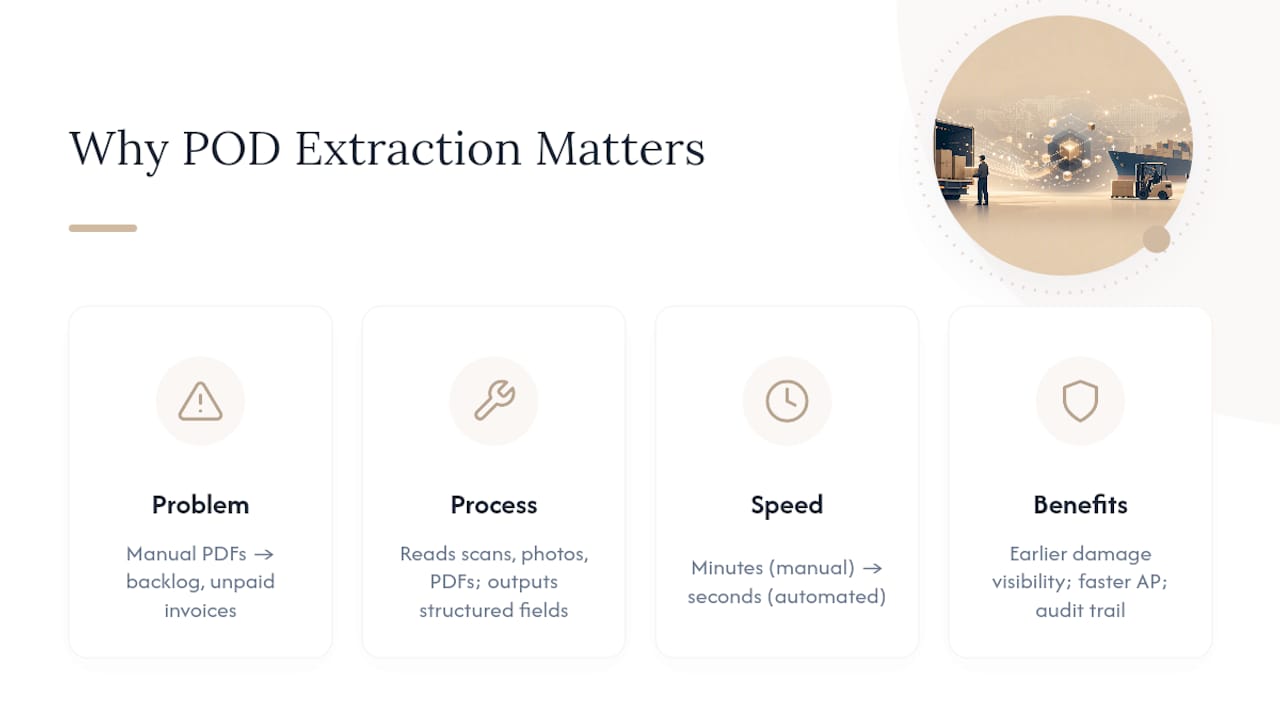
Manual delivery confirmation still dominates in a surprising number of freight and parcel operations. Someone opens a PDF, squints at a scanned signature block, and types the delivery date into a spreadsheet or TMS field by hand. Multiply that by hundreds of shipments a week and the backlog becomes the reason invoices sit unpaid, claims miss filing windows, and disputes drag on because nobody can quickly produce the receipt that proves what actually happened at the dock.
Automated extraction changes the economics of that process. Once a document lands in the pipeline, extraction, validation, and matching happen in seconds rather than minutes, which is exactly the gap Logentic’s AI agent targets in email-based logistics workflows. The result isn’t just faster paperwork. It’s earlier visibility into damaged freight, faster AP release cycles, and a defensible audit trail when a customer disputes a delivery.
Canonical POD Fields to Extract and Why Each Matters
A stable field schema is what separates a reliable extraction pipeline from one that breaks every time a new carrier template shows up. Most production systems converge on the same core set, because each field maps to a specific downstream decision.
- Recipient name and delivery address: These anchor the match to a shipment record and confirm the load reached the correct consignee, not just a nearby dock.
- Signature presence (boolean) and printed signatory name: Signature presence is a routing signal, not proof of identity. A checked box tells you a delivery event was acknowledged; the printed name gives a human reviewer something to verify against the bill of lading when a dispute arises.
- Delivery date and time: This is the field that drives on-time performance metrics and detention or demurrage calculations, so it needs to be captured as a proper timestamp, not a loose text string.
- Tracking or shipment ID: The match key that ties the POD back to the order, load, or container it belongs to. Without a clean ID, every other field is orphaned data.
- Line-item arrays: Quantities delivered, units, and condition notes per line let AP and receiving teams catch shortages or damage at the SKU level instead of at the shipment level.
- Exception notes: Free-text or checkbox annotations (“2 pallets damaged,” “refused, wrong product”) that need their own classification layer, since they trigger different downstream workflows than a clean delivery.
Header fields (recipient, address, shipment ID) do the matching work. Line items and exception notes do the reconciliation and dispute work. Treating them as one undifferentiated blob of “POD data” is the most common design mistake teams make when they first automate this process.
The End-to-End Extraction Pipeline, Step by Step
Building a production-grade pipeline means moving a document through five distinct stages, each with its own failure modes and controls.
- Ingestion: PODs arrive through email attachments, carrier portals, driver mobile apps, EDI feeds, or fax (yes, still fax in some trucking niches). The strongest setups capture documents at the point of arrival automatically, rather than waiting for someone to forward an email, leveraging advanced delivery and parcel management features for seamless ingestion.
- Classification: Before extraction can run, the system needs to know it’s looking at a POD and not a delivery note, packing slip, or invoice. Document classifiers trained on layout and text cues handle this triage step, routing each file to the correct extraction template.
- Extraction: This is where OCR, document AI, or a hybrid of both reads the page. Pure OCR handles clean, typed text well but struggles with handwriting and inconsistent layouts. Document AI models, trained on document structure rather than just character shapes, generalize better across the dozens of carrier-specific POD formats a typical freight forwarder encounters, a distinction worth understanding before choosing a document AI approach over legacy OCR.
- Normalization: Raw extracted text gets converted into typed fields: dates into ISO timestamps, addresses into structured components, quantities into decimals. This step is what makes the data usable in a pivot table or an ERP field instead of just readable to a person.
- Verification: Every extracted field gets a confidence score. High-confidence fields flow straight through; low-confidence fields route to a manual review queue instead of silently entering the system as unverified data.
Retrieval-augmented approaches add a further layer here, combining extracted POD fields with external shipment records and carrier knowledge bases so the system can answer reconciliation questions and summarize exceptions automatically, a pattern documented in Microsoft’s work on retrieval-augmented generation for document intelligence.
Pro Tip: Set your confidence threshold per field, not per document. A POD can have a rock-solid delivery date and a garbled signatory name in the same image. Blanket document-level thresholds either flood your review queue or let bad data through.
Matching Extracted PODs to Shipments, Invoices, and Claims
Extraction only creates value once the structured POD record gets matched against another system of record. The match key and the tolerance rules differ depending on which workflow is consuming the data.
- AP invoice matching: Match on shipment ID or tracking number, then compare delivered quantity against invoiced quantity. A gate rule releases payment automatically when quantities align and signature presence is true; anything else routes to a controller.
- Receiving controls: Match on purchase order or shipment ID, then flag any line where delivered quantity falls short of ordered quantity beyond an agreed tolerance, commonly 2 to 5 percent depending on commodity type.
- Freight and carrier audit: Match delivery date and time against contracted transit windows to catch late-delivery penalties or detention charges the carrier didn’t self-report.
- Parcel and claims audit: Match exception notes and signature status against the claim filing window; a missing signature combined with a damage note is the trigger to open a claims case immediately rather than waiting for a customer complaint.
Unmatched PODs, the ones with no clean shipment ID, need a fallback. The practical approach pairs fuzzy matching on recipient name and delivery address with a date-window filter, then routes anything still unresolved to a human for a five-minute manual link rather than letting it sit in limbo indefinitely.
Routing Exceptions: Damaged, Short, Refused, and Illegible
Not every POD closes cleanly, and the exceptions are where extraction earns its keep. A system that only handles the easy cases still leaves your team drowning in the hard ones.
- Damaged or short shipments: Classify exception text (handwritten or typed) against a controlled vocabulary of outcome categories, then attach the flagged line items directly to a claims packet.
- Refused deliveries: Treat as a distinct exception type from “damaged,” since refusals usually trigger a return-to-origin workflow rather than a claims filing.
- Illegible or missing signatures: Flag as low-confidence rather than false. A blank signature field could mean a legitimate contactless delivery or a documentation failure. Don’t assume either without a review step.
- Handwritten driver notes: Route to a specialized handwriting recognition model rather than the standard OCR path, since mixed handwritten and printed text on the same document confuses generic extractors.
Pro Tip: Package the evidence automatically the moment an exception is detected: the POD image, the extracted fields, and a timestamp. Claims teams that have to go hunt for the source document after the fact lose days they don’t need to lose.
Choosing Output Formats and Integration Targets
The right output shape depends entirely on who consumes the data next, not on what the extraction engine can technically produce.
- CSV: Best for bulk historical loads or one-off reconciliation projects where a team just needs to pivot data in a spreadsheet.
- Excel: Useful when controllers or claims analysts need a human-reviewable format with confidence scores visible in adjacent columns, rather than a raw data dump.
- JSON: The right choice for any system-to-system integration, since nested arrays (line items, exception lists) map cleanly without flattening data into repeated rows.
- API/webhook delivery: Pushes each extracted POD record into a TMS, ERP, AP system, or WMS the moment it’s verified, which is what makes near-real-time reconciliation possible instead of batch-processing at day’s end.
A TMS typically consumes the shipment ID, delivery timestamp, and signature status to close out a load automatically, an integration pattern that shows up directly in how Track & Trace systems update delivery status. AP systems care most about quantity and condition fields for three-way matching. Claims systems want the exception notes and the linked image evidence bundled together. Structured JSON output with GPS or photo flags attached is already standard in several delivery docket extraction tools on the market, underscoring that this output shape is becoming the default rather than the exception.
Why Photos, Handwriting, and Fax Still Break Extraction
Clean, typed, high-resolution documents are the exception in delivery paperwork, not the rule. Most PODs arrive as a driver’s phone photo taken in a dim warehouse, a third-generation fax, or a scan with a coffee ring on it.
- Low-resolution photos: Apply deskew, denoise, and contrast normalization before extraction runs. Skipping preprocessing is the single biggest reason accuracy rates collapse on mobile-captured images.
- Handwriting: Standard OCR was never built for cursive or rushed driver scrawl. Multi-stage models that combine layout detection with dedicated handwriting recognition perform meaningfully better on these documents, a trend confirmed in recent document image understanding research using synthetic data augmentation to train on messier, real-world samples.
- Fax artifacts: Compression noise and skewed feed angles need their own cleanup pass; treating fax output the same as a flatbed scan produces avoidable errors.
- Confidence-based QA sampling: Rather than reviewing every document, sample a percentage of high-confidence extractions weekly to catch silent model drift before it becomes a pattern.
Field-level confidence scoring paired with a pixel-region pointer back to the source document lets a reviewer jump straight to the exact spot on the page that needs a second look, cutting manual verification time considerably compared to re-reading the whole document from scratch.
Building a Pilot: Checklist and a Copyable Extraction Schema
A pilot succeeds or fails based on how representative the sample set is. Pulling only your cleanest carrier’s documents will make any extraction tool look great and tell you nothing about production reality.
- Select a sample spanning your three or four highest-volume carriers, deliberately including your worst document quality, not just your best.
- Define success metrics before you start: target extraction accuracy per field, not an overall document score.
- Identify integration endpoints early (TMS API, AP system, claims database) so extracted data has somewhere real to land.
- Build a manual-review lane from day one for anything below your confidence threshold, rather than bolting one on after volume grows.
A well-scoped pilot with a representative document mix tends to surface most of the edge cases your team will ever encounter, well before full production rollout. For the schema itself, the extract-delivery-receipt-data skill on GitHub offers a practical, ready-to-adapt structure:
| Field name | Type | Purpose |
|---|---|---|
| delivery_receipt_number | STRING | Primary document identifier |
| tracking_number | STRING | Shipment match key |
| recipient_name | STRING | Consignee verification |
| delivered_items | ARRAY | Line-level quantity and condition |
| signature_present | BOOLEAN | Delivery acknowledgment flag |
| exception_notes | STRING | Damage, shortage, or refusal detail |
Nesting delivered items as a typed array, rather than flattening them into text, is what lets this schema plug straight into a reconciliation pivot without a rebuild.
Logentic’s Approach to Proof of Delivery Extraction
Logentic built its extraction pipeline around the same operational problem this article describes: documents arriving by email that need to become structured data inside a TMS in seconds, not minutes. In pilot deployments, an AI agent has processed inbound delivery and shipment documents in roughly eight seconds each, down from the several minutes a manual entry typically takes.
A controller shouldn’t have to open a PDF, find the signature block, and retype a delivery date by hand. The document arrives, the fields get extracted with a confidence score attached, and anything uncertain lands in a review lane instead of silently entering the system.
That confidence-gated model is deliberate. High-confidence fields feed a direct JSON connection into the TMS. Anything below threshold routes to an Excel-based review lane where a controller can check the flagged field against the source image before it moves forward, keeping human judgment in the loop exactly where it adds value.
What Most Teams Get Wrong About POD Automation
The conventional advice on this topic treats extraction accuracy as the finish line. It isn’t. A model that reads 98 percent of fields correctly still fails the business if nobody built a routing path for the other 2 percent, and that’s where most pilots quietly stall out.
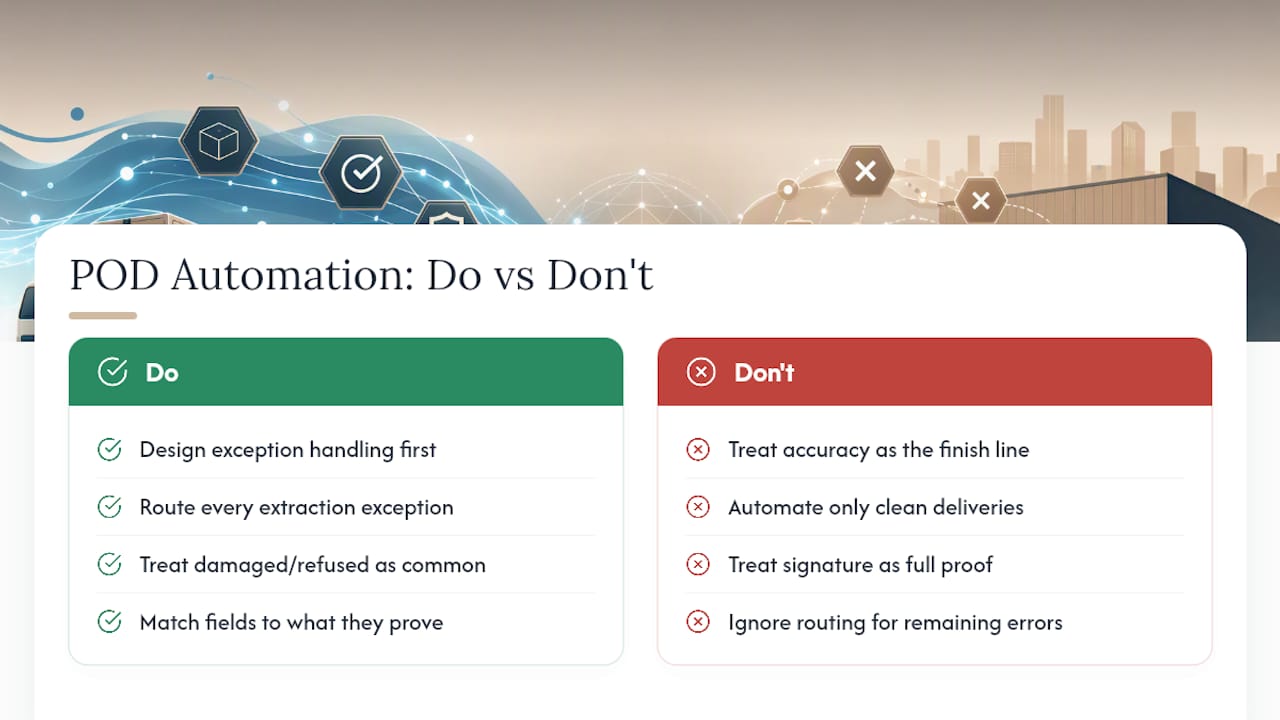
The teams that get real value from this technology treat exception handling as the primary design problem, not an afterthought bolted onto a working happy path. Damaged freight, refused loads, and illegible signatures are not edge cases in most freight and parcel operations. Depending on the lane and commodity, they can represent a meaningful share of weekly volume, and a pipeline that only automates the clean deliveries just moves the bottleneck instead of removing it.
The other overlooked point: signature presence gets treated as proof when it’s really just a flag. A checked box tells you something happened at the dock. It doesn’t tell you who signed, whether the goods matched the manifest, or whether the driver even confirmed the count. Build your matching rules around what each field actually proves, not what it seems to imply, and the whole system gets more trustworthy, not less automated.
— Bogdan
Get Proof of Delivery Extraction Running Without an IT Project
Most teams evaluating this technology assume they need a lengthy integration project before they see any benefit. The advantage is automation that connects directly to existing TMS systems, without requiring migration or lengthy implementation cycles. Since delivery confirmations mostly arrive as email attachments in the first place, Logentic’s Email Automation reads those messages, extracts the POD fields, and writes them straight into your existing system.

For teams already juggling bills of lading and CMRs alongside delivery receipts, B/L & CMR Processing extends the same extraction logic across your full document stack, so matching and reconciliation run against one consistent pipeline instead of three separate tools. If your operation handles Dutch or European customs paperwork too, that same document-AI foundation carries over to Customs Preparation. Start with a pilot on your highest-volume carrier’s delivery documents and see the extraction accuracy for yourself before touching anything else in your stack.
Sources
- extract-delivery-receipt-data (IterationLayer GitHub)
- Retrieval-augmented generation (Document Intelligence, Microsoft)
- 49 CFR § 373.101 (Federal regulations reference)
- arXiv preprint on document image understanding
FAQ
How do I get a copy of my delivery proof?
Request it from the carrier’s portal, your TMS document archive, or the original email attachment if it arrived digitally. Once extraction is automated, the structured record and the source image both live in your system already, searchable by shipment ID or delivery date instead of requiring a manual carrier request.
How do I get proof of delivery data into SAP?
Extracted POD fields typically enter SAP through a direct API or file-based integration (IDoc or a structured CSV/JSON import), matched against the purchase order or shipment number already in the system. The extraction layer sits upstream of SAP, handling the document reading so only clean, validated fields reach the ERP.
What qualifies as proof of delivery?
A valid POD generally needs a recipient identifier, a delivery timestamp, and some acknowledgment of receipt, most commonly a signature, though contactless delivery photos are increasingly accepted. What counts as sufficient evidence for a dispute or claim depends on the specific contract or regulatory recordkeeping requirements governing that shipment.
What is the proof of delivery process end to end?
The process runs from document capture (email, portal, driver app) through classification, field extraction, normalization, and matching against the shipment or invoice record. Exceptions like damage or refusal get flagged and routed separately, while clean matches flow straight through to AP release or receiving clearance, often in seconds rather than the several minutes manual entry requires.
Does Logentic handle proof of delivery extraction?
Yes. Certain AI software extracts POD fields from documents arriving by email and writes verified data directly into a TMS, with low-confidence fields routed to a manual review lane. Current pricing for Email Automation and related services is available directly on the Logentic site.
Recommended
Want to see how Logentic automates this work?
Book a call →