Parse Logistics Emails in 8 Seconds: Pilot Ready for Freight Ops, TMS
An operations first plan to parse logistics emails into your TMS in about eight seconds per message, piloted on 200–500 sample emails.

Yes, AI can parse inbound logistics emails into structured shipment records ready for quoting or booking. The pipeline runs monitor, classify, extract, normalize, validate, push, and turn a quote request or a proof of delivery into a clean row in your TMS or quoting sheet promptly. Done well, it pulls origin and destination, weight and dimensions, commodity, service level, dates, and accessorial flags, cutting manual entry time and the copy-paste errors that come with it.
TL;DR:
- Extracting only core fields like origin, destination, weight, and dates during initial pilots improves accuracy and trust more than trying to capture all possible data points.
- Normalizing data with standardized address, unit, and code mappings is essential to ensure reliable entries in your TMS and reduce downstream errors.
- Handling diverse email formats requires a fallback process from body text to attachments and OCR, with fuzzy mapping for inconsistent tables and thread awareness.
- Confidence thresholds above 90 percent help ensure high auto-acceptance rates while routing uncertain records for review, reducing manual workload and errors.
- Focus on automating routine, low-ambiguity emails first, and continuously monitor accuracy and format changes to maintain high performance over time.
Table of Contents
- What Does It Mean to Parse Logistics Emails?
- What Fields Should You Extract From Freight Quotes and PODs?
- How Do You Normalize Data for Reliable TMS Entry?
- How Do You Handle PDFs, Images, and Forwarded Email Threads?
- How Should You Set Confidence Thresholds for Auto-Acceptance?
- What Are the Best Output and Integration Patterns?
- How Do You Pilot Email Parsing Before Full Rollout?
- What Does Logentic Deliver on Email Parsing and TMS Integration?
- How Do You Handle Multilingual and Inconsistently Formatted Emails?
- How Do You Extract Data From Unstructured or Semi-Structured Emails?
- How Do You Keep Accuracy High as Email Formats Change?
- Where Does Parsing Automation Deliver the Highest Return?
- Try Logentic’s Email Automation on Your Own Inbox
- Sources
- FAQ
What Does It Mean to Parse Logistics Emails?
Email parsing logistics teams use today means extracting specific data points from unstructured email text and turning them into structured, machine-readable fields. A quote request that reads like a casual note (“need a rate LA to Chicago, 3 pallets, about 1,200 lbs, need it there by Friday”) becomes a row with populated origin, destination, weight, and date fields instead of a wall of text a coordinator has to reread three times.
The workflow that makes this reliable follows a consistent order:
- Monitor the mailbox. A connected inbox watches for new messages matching freight-related patterns, whether that’s a dedicated quoting alias or a shared operations inbox.
- Classify intent. The system tags each email as a quote request, a booking confirmation, a proof of delivery, or an exception (a delay notice, a rate dispute, a document correction).
- Select the extraction schema. Different email types need different field sets. A POD needs delivery timestamp and signature status; a quote request needs weight and commodity.
- Extract the fields. The model pulls values from body text, HTML tables, or attachments.
- Normalize the values. Raw text gets mapped to canonical formats, country codes, units, freight classes.
- Validate. Rule checks and confidence scoring catch missing or suspicious fields before anything moves downstream.
- Push to the destination. A validated record lands in the TMS, a spreadsheet, or a webhook.
Most platforms process new messages asynchronously in a queue, but high-volume booking confirmations sometimes justify synchronous processing so the reply can trigger an immediate acknowledgment.
What Fields Should You Extract From Freight Quotes and PODs?
Prioritizing the right fields matters more than extracting everything possible. A pilot that tries to capture forty data points on day one usually produces forty ways to fail. A pilot that nails ten fields builds trust fast.
The core fields that belong in nearly every logistics email parsing schema:
- Origin and destination (city, state or province, postal code, country)
- Weight and dimensions (with unit of measure explicit)
- Commodity description and, where relevant, NMFC or freight class
- Service level (standard, expedited, guaranteed, LTL vs. FTL)
- Pickup and delivery dates, including requested windows
- Reference numbers (PO number, BOL number, quote ID)
Ancillary flags reduce downstream surprises far more than their small footprint suggests: hazmat status, liftgate requirement, residential delivery, appointment-required, inside delivery. Missing one of these on a booking often means a failed delivery attempt and an angry customer call, not just a data gap.
During a pilot, make core fields required and treat ancillary flags as optional captures you tune over time. McKinsey’s operations research on process automation consistently finds that phased rollouts with narrow initial scope outperform full-scope launches on both accuracy and adoption.
How Do You Normalize Data for Reliable TMS Entry?
Extraction only solves half the problem. A field labeled “weight: 1200” is useless if your TMS expects kilograms and the sender meant pounds, or if “CA” could mean California or Canada depending on context. Normalization is the layer that makes email parsing logistics workflows trustworthy at scale.
Build these rules into your schema before you extract a single field:
- Map state and country references to ISO codes (US state abbreviations, ISO 3166 country codes)
- Standardize units of measure (lbs vs. kg, inches vs. centimeters) with the source unit always captured alongside the converted value
- Map freight class and commodity descriptions to your carrier’s accepted taxonomy
- Standardize addresses against a validated address format, not free text
- Define enums for service level and equipment type so “reefer,” “refrigerated,” and “temp-controlled” all resolve to one value
Decide upfront which fields are required to accept a record and which are optional. A missing accessorial flag might still allow auto-acceptance; a missing destination should not.
Pro Tip: Run every parsed record through a lightweight JSON schema validator before it touches your TMS. Rejecting a malformed record at the schema gate costs you nothing; letting it into a live booking costs you a phone call and a redo. AIIM’s information management guidance backs this up: validation at the point of intake is consistently cheaper than correction after the fact.
How Do You Handle PDFs, Images, and Forwarded Email Threads?
Not every logistics email arrives as clean body text. Rate confirmations often come as PDF attachments, PODs as scanned images, and quote requests buried three replies deep in a forwarded thread. Your extraction logic needs a defined fallback order rather than a single extraction attempt.
The practical sequence looks like this:
- Check the email body first. Plain text or HTML almost always parses faster and more reliably than an attachment.
- Check HTML tables next. Many carrier notifications embed structured tables in the message itself.
- Fall back to attachments when the body lacks the needed fields, PDFs, Excel sheets, or scanned documents.
- Call OCR or vision models last, reserved for image-based PDFs or photographed paperwork where no text layer exists.
Attachment tables rarely match your schema column-for-column. A carrier’s rate confirmation might list “Wt (lbs)” where your schema expects “weight_lbs,” so mapping logic needs fuzzy column matching, not exact string matches.
Forwarded threads add another wrinkle: the newest message in a chain isn’t always the authoritative one. A broker forwarding a shipper’s original request with added notes means your parser needs to identify which message actually carries the binding details, not just grab the top of the thread.
How Should You Set Confidence Thresholds for Auto-Acceptance?
Combining rule-based checks with a model’s confidence score is the difference between an automation system operators trust and one they quietly stop relying on. Gartner’s guidance on AI and machine learning for enterprise information workloads points to layered validation, rules plus model scoring, as the pattern that scales without ballooning error rates.
A workable structure:
- Set a high-confidence auto-accept threshold (commonly 90 percent or above) for records where every required field extracted cleanly and passed rule checks.
- Route mid-confidence records to a review queue with the specific uncertain field flagged, not the whole record.
- Auto-generate a clarification reply for records missing a required field, asking the sender a targeted question rather than the full quote form again.
- Assign a triage owner and SLA for the exception lane so flagged records don’t sit untouched for a day.
Thread awareness matters here more than it first appears. If a shipper replies to a clarification request with just “1,450 lbs,” the system needs to apply that correction to the original record rather than opening a duplicate one. Without thread context, exception handling multiplies work instead of reducing it.
What Are the Best Output and Integration Patterns?
How you deliver parsed data matters almost as much as how accurately you extract it. Three patterns cover most logistics email parsing tools in production:
- Synchronous parse API calls, where a request returns a structured response immediately, fitting workflows that need instant confirmation, like documented parse endpoint patterns used for shipping notifications.
- Webhook delivery, pushing each parsed record to a receiving endpoint as it completes, well suited to high-volume inboxes feeding a TMS continuously. Integration platforms like Zapier and Make document common webhook and app-to-app routing patterns for this exact use case.
- Batch writes to CSV or Google Sheets, appropriate for lower-volume operations or a pilot phase where a spreadsheet is still the shared source of truth.
Whichever pattern you choose, build in idempotency. Use a deduplication key, tracking number plus carrier, or a quote request ID, so a resent email or a retried webhook doesn’t create a duplicate shipment record. TMS platforms and quoting tools generally expect a unique reference on write; skipping this step is the single most common cause of duplicate bookings in early automation rollouts.
How Do You Pilot Email Parsing Before Full Rollout?
A disciplined pilot beats a big-bang rollout every time, and it takes less setup than most teams assume.
- Collect 200 to 500 anonymized sample emails spanning your real mix of quote requests, confirmations, and PODs.
- Define your field taxonomy using the required and optional field breakdown covered earlier.
- Run shadow mode for two to four weeks, letting the system parse live email alongside your human team without acting on the output, so you can compare results side by side.
- Tune extraction templates and confidence thresholds based on where shadow-mode results diverged from what a person entered.
- Track field-level accuracy, not just overall accuracy, since a system can hit 95 percent overall while consistently missing one specific field.
Track four numbers throughout: automation rate (percentage requiring zero human touch), clarification rate (percentage needing a follow-up email), time-to-entry reduction, and accuracy per field. McKinsey’s automation research treats this kind of phased measurement as the reliable predictor of whether a scaled rollout will actually hold up.
Pro Tip: Don’t tune for overall accuracy first. Tune for your highest-volume field. A 2 percent gain on the field that appears in every single email beats a 10 percent gain on a rarely-used accessorial flag.
What Does Logentic Deliver on Email Parsing and TMS Integration?
An AI agent can read inbound logistics emails, extract the relevant shipment data, and enter it directly into the TMS, cutting a task that typically takes several minutes down to roughly eight seconds per email. Processing speed comes from combining classification, extraction, and validation in a single automated pass instead of routing each step through separate tools.
The system is built for integration with existing infrastructure, connecting with platforms like CargoWise, Softpak, Descartes, and Portbase, along with major carrier APIs, so teams don’t need to replace their TMS to adopt it. For freight forwarders and customs agents managing document-heavy workflows, document processing for CMRs and Bills of Lading runs through the same extraction and validation logic as inbound email.
How Do You Handle Multilingual and Inconsistently Formatted Emails?
Freight forwarding is a global business, and your inbox reflects that. A quote request might arrive in German from a shipper in Hamburg, a booking confirmation in Spanish from a Mexican carrier, and a POD in French from a Belgian customs broker, sometimes all in the same afternoon. A parsing system built around English-only templates breaks the moment volume scales past a single trade lane.
The practical fix is a language-detection step ahead of extraction, not a separate parsing pipeline per language. Modern large language models handle multilingual extraction reasonably well without needing a dedicated model per language, since the underlying task, identifying that a number followed by “kg” is a weight field, holds regardless of what language surrounds it. What actually breaks parsing more often than language itself is format inconsistency: one carrier sends a clean HTML table, another sends a wall of plain text, a third pastes a screenshot of a spreadsheet into the email body.
Building a schema-first approach helps here. Rather than writing extraction logic tied to a specific layout, the system should look for semantic patterns, a date near a delivery reference, a number near a weight unit, regardless of where those patterns sit on the page. This is also where thread awareness earns its keep: a German-language quote request followed by an English-language clarification reply from a customs agent needs to be read as one continuous record, not two disconnected messages in different languages.
How Do You Extract Data From Unstructured or Semi-Structured Emails?
Most logistics emails fall somewhere between a rigid form and a stream-of-consciousness paragraph. A dispatcher might write “picking up Tuesday, drop Thursday, it’s the usual 40ft container to the Rotterdam yard” with zero labeled fields anywhere in the message. This is where rule-based extraction, the kind that looks for a label like “Weight:” followed by a number, falls apart completely.
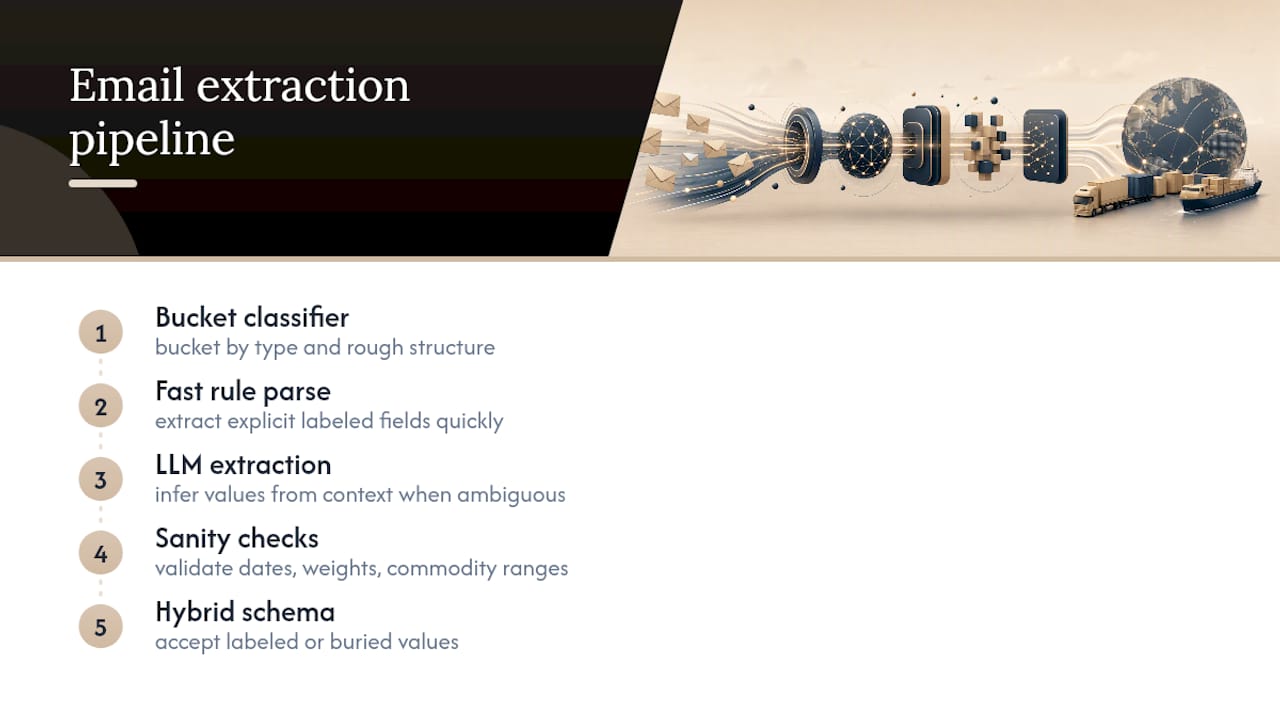
Large language models handle this better than pattern matching because they extract meaning from context rather than position. The model doesn’t need “Weight:” to appear; it infers that “1,200 lbs” following a mention of pallets is almost certainly the shipment weight. Combining this with rule-based sanity checks, does the extracted date fall in the future, does the weight fall within a plausible range for the stated commodity, catches the cases where a model’s contextual guess is wrong.
One layered approach worth adopting: run a lightweight classifier first to bucket the email by type and rough structure, then apply the LLM’s full extraction only where the case is genuinely ambiguous. This dual-stage approach, described in detail by iService’s email intelligence research, keeps costs down while reserving the expensive, high-context extraction for the emails that actually need it, the strangely worded quote request rather than the tenth identical carrier confirmation of the day.
Semi-structured emails, ones with some labeled fields and some free text, benefit from a hybrid schema that accepts either format for the same field. If “Weight” sometimes appears as a labeled line and sometimes as a number buried in a sentence, your extraction schema should accept both without treating one as a failure case.
How Do You Keep Accuracy High as Email Formats Change?
Extraction accuracy degrades quietly if nobody’s watching for it. A carrier redesigns their confirmation template, a new customs broker starts sending PODs in a format your schema has never seen, and suddenly your automation rate drops from 85 percent to 60 percent over a few weeks without anyone noticing until someone complains about a missed booking.
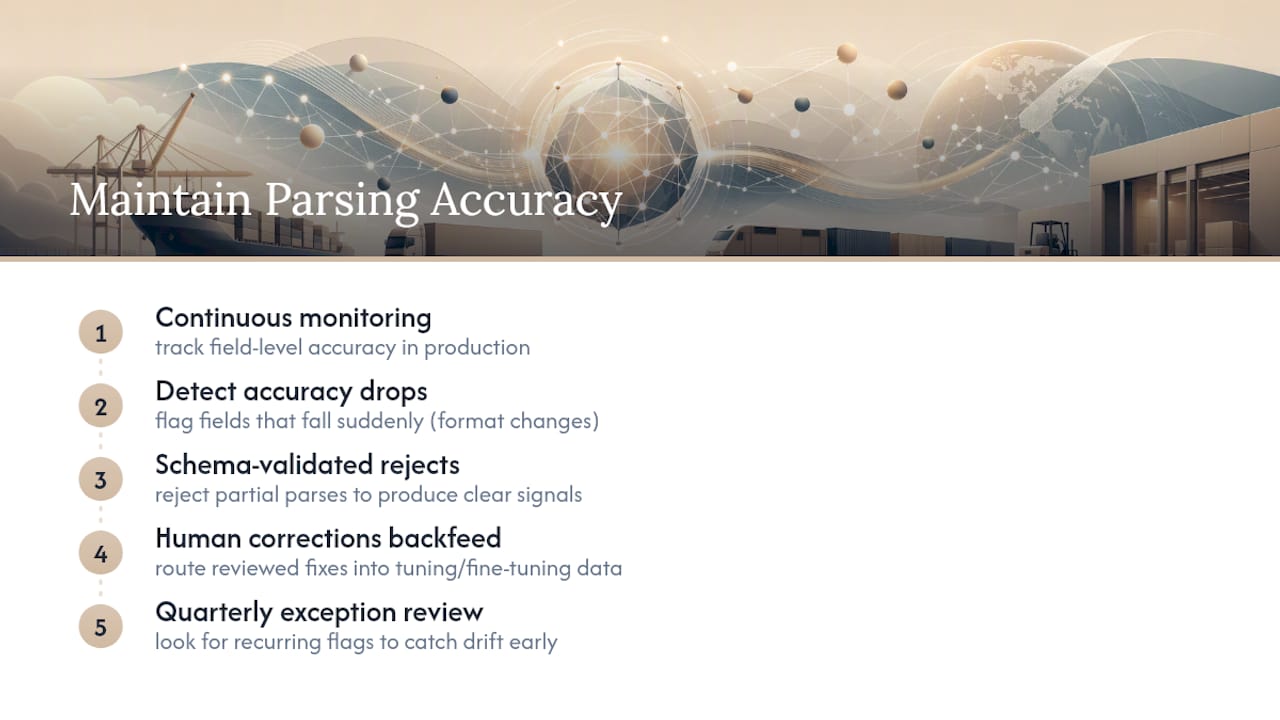
The fix is treating your parsing system the way you’d treat any operational process, with ongoing measurement, not a one-time setup. Field-level accuracy tracking, checked in the implementation phase, needs to keep running in production. When a specific field’s accuracy drops, that’s usually the first sign a sender changed their format, not evidence the model got worse.
Feeding corrected records back into your extraction logic is the other half of the loop. When a human reviewer corrects a flagged record in the exception queue, that correction is a labeled training example. Systems that route these corrections back into prompt tuning or fine-tuning data improve steadily; systems that treat each correction as a one-off fix stay stuck at whatever accuracy they launched with.
Schema-validated parse APIs, the kind that reject a partial parse outright rather than silently pushing incomplete data downstream, make this feedback loop cleaner because every rejection is a clear signal of exactly where the model struggled, as MailFrame’s documentation on shipping notification parsing lays out. A quarterly review of your exception queue, looking for patterns in what keeps getting flagged, catches format drift before it becomes a customer complaint.
Where Does Parsing Automation Deliver the Highest Return?
Automate the high-volume, low-ambiguity traffic first: routine rate confirmations, standard PODs, repeat-customer quote requests. That’s where the eight-second processing time actually compounds into hours saved every week, as seen with PackLogica’s fulfillment and outbound logistics intelligence for mid-market e-commerce. Keep a human in the loop on anything involving a new customer, an unusual commodity, or a hazmat shipment. The cost of a wrong guess there outweighs the time saved.
Expect a real tuning period, not a switch you flip once. Formats shift, carriers redesign templates, and accuracy holds only if someone’s watching the exception queue and feeding corrections back in.
— Bogdan
Try Logentic’s Email Automation on Your Own Inbox
Logentic’s Email Automation reads inbound quote requests, booking confirmations, and PODs the way this article describes, classifying, extracting, normalizing, and validating each one before pushing a clean record into your TMS. Such AI agents handle the repetitive extraction work and flag only the records that genuinely need a human look, reducing the need for coordinators to retype fields from different email formats every day. It can connect with platforms like CargoWise, Softpak, Descartes, and Portbase, allowing adoption without requiring replacement of existing systems. If your inbox is the bottleneck in your quoting or booking process, start a pilot on Logentic and see how many of your recurring email types it handles from week one.
Sources
FAQ
What Does It Mean to Parse a Logistics Email?
Parsing means pulling specific data points, like origin, weight, or delivery date, out of unstructured email text and converting them into structured fields a TMS or spreadsheet can use directly.
How Do You Confirm an Order by Email Automatically?
An automated system extracts the order details from the inbound email, validates them against required fields, and sends a templated confirmation reply once confidence checks pass, flagging anything uncertain for human review instead of confirming blind.
How Can You Parse Emails Without Building a Custom Model?
Most teams use a parsing platform or API rather than training a model from scratch, feeding it sample emails to define extraction rules and confidence thresholds; Logentic’s Email Automation is built specifically for logistics email formats rather than general-purpose parsing.
How Can You Parse Emails Using Python?
Python developers typically connect to an email inbox via IMAP, then pass message content to a parsing library or API, such as the pattern shown in this email-parse API documentation, which returns structured fields from raw email content.
What’s a Reasonable Automation Rate to Expect From a Pilot?
Results vary by email volume and format consistency, but tracking automation rate, clarification rate, and field-level accuracy during a two-to-four-week shadow-mode pilot gives a realistic baseline before scaling.
Recommended
Want to see how Logentic automates this work?
Book a call →