Prove Freight Email Processing ROI in a 4–6 Week Pilot for Freight Ops
Prove freight email processing in 4–6 weeks. Run an operator first pilot, track five KPIs, and test Logentic's eight second TMS entry to verify value.

AI freight email processing reads incoming messages, pulls out shipment data, and writes it directly into your TMS, cutting a task that took several minutes down to seconds. The immediate payoff is faster quote turnaround, fewer manual re-keys, and better SLA adherence. Forwarders, brokers, carrier ops teams, and anyone running high email volume through a TMS see the biggest gains, especially on lanes where quote speed decides who wins the booking.
TL;DR:
- AI email processing automates sorting, extracting, and routing freight messages, significantly reducing manual data entry time and improving quote speed for high-volume lanes.
- Integration typically uses webhooks or APIs to transfer structured data into TMS systems while preserving email threading and shipment references for accuracy.
- Running a pilot over four to six weeks with defined thresholds and operator overrides minimizes risk and proves ROI through metrics like time-to-action, SLA compliance, and manual correction rates.
- Ensuring data security requires encrypted processing, signed agreements, and access audits, with options for private or on-premises AI environments to protect sensitive shipment and customer information.
- Logentic’s Alex is designed specifically for freight inbox workflows, capable of handling RFQs, bookings, status updates, and attached documents without custom setup, simplifying onboarding and evaluation.
Table of Contents
- What Does Freight Email Processing Actually Automate?
- How Does Processed Email Data Reach Your TMS?
- What Does a Realistic Pilot Timeline Look Like?
- How Do You Measure ROI on Email Automation?
- Is Email Data Safe When AI Processes It?
- What Do Real Freight Emails Look Like Once Automated?
- Why Logentic Built Alex Around This Exact Problem
- How Do You Evaluate a Pilot Before Committing Further?
- How Should Operators Think About Adopting This?
- Ready to Test Freight Email Processing on Your Own Lanes?
- Sources
- FAQ
What Does Freight Email Processing Actually Automate?
The operational mailbox is the real front door of a forwarding business, and most of what comes through it falls into a handful of predictable shapes: RFQs, booking confirmations, invoices, status updates, and customs paperwork. AI email processing starts by sorting that traffic automatically.
- Classification and priority tagging. Each message gets sorted by type (RFQ, booking, invoice, status, customs) and flagged by urgency, so a rate request from a top account never sits behind a routine status ping.
- Structured field extraction. The system pulls origin, destination, cargo specs, dates, and Bill of Lading or CMR fields from both the email body and attached PDFs or scans.
- Auto-drafted replies. When a quote request is missing a weight, a port, or a commodity code, the tool drafts a follow-up asking for exactly what’s missing instead of leaving it for someone to notice.
- Routing and shipment attachment. Every message gets tied to the correct owner and the correct shipment reference, so nothing floats loose in a shared inbox.
The distinction between this and basic OCR matters here. Document AI reads context and relationships across a message and its attachments, not just characters on a page, which is why document AI functions as a genuinely different category from older scanning tools.
How Does Processed Email Data Reach Your TMS?
Extraction only creates value once the data lands where operators actually work. That means building a bridge between the inbox and the TMS that doesn’t require ripping out either one.
- Pick an integration pattern. Most setups use a webhook that fires on a new parsed message and creates or updates a TMS record, though some teams still prefer a CSV/ETL batch for legacy systems. Complete inbound email platforms can receive, parse, and route messages to a webhook within seconds of arrival, which is the pattern most freight automation tools build on.
- Define the payload. A structured output typically includes shipper, consignee, origin, destination, cargo description, weight, dates, and a list of parsed attachment fields, each tagged to the source document.
- Preserve threading. Message ID, in reply to, and reference headers get carried through so a follow up email stays linked to the same shipment thread instead of opening a duplicate record.
- Prepare your endpoints. Ops teams need at least one working webhook or TMS API endpoint ready before onboarding, along with sample historical emails so the parser can be tuned to your actual document formats.
Cloud email infrastructure now makes this simpler than it used to be. Services built for inbound message routing to serverless workers let automation vendors process mail without stitching together a dozen third-party tools, and that same architecture is what lets platforms like Logentic’s AI agent sit on top of an existing TMS rather than replacing it.
What Does a Realistic Pilot Timeline Look Like?
Rolling out email automation across an entire operation on day one is how pilots fail. Scope it down first, prove the model works, then expand.
- Start with two to four mailboxes on your busiest lanes, not the entire domain.
- Configure domain and alias forwarding, then set parsing rules against a sample of real historical emails.
- Build reply templates for the two or three most common missing-field scenarios before going live.
- Connect one integration endpoint (webhook or TMS API) and confirm test records land correctly before sending real traffic through it.
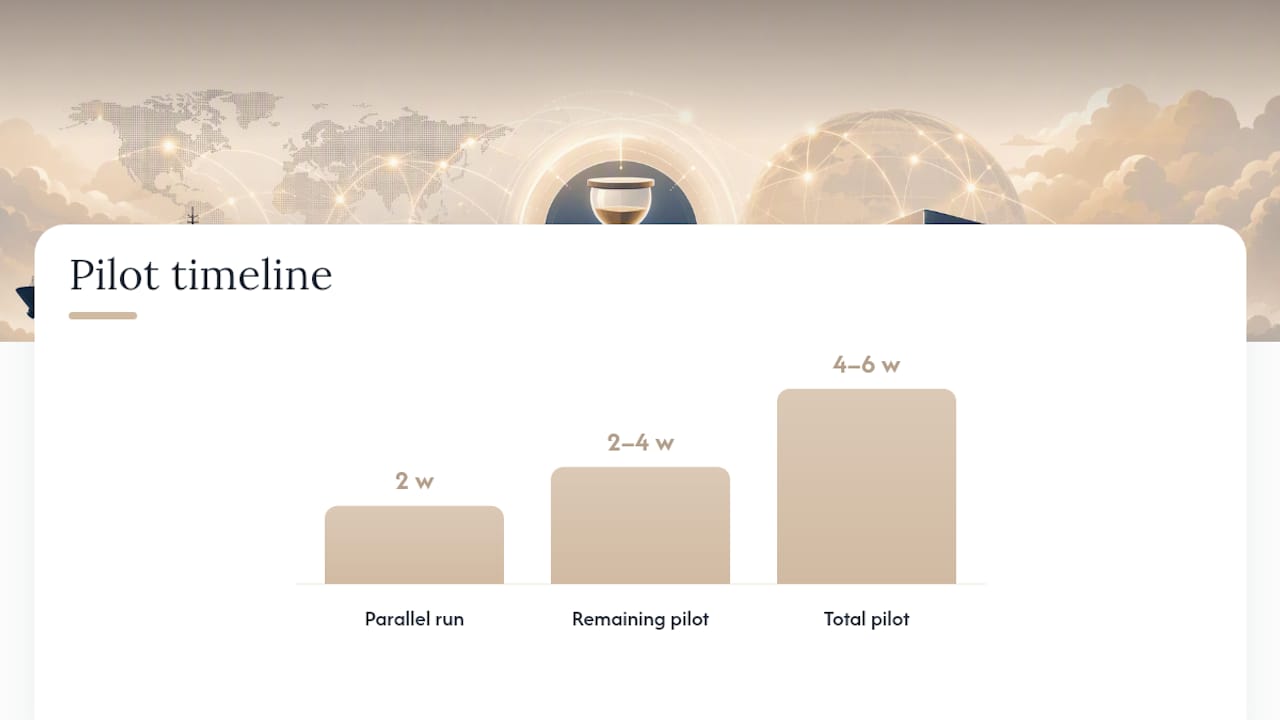
A pilot scoped this way typically runs four to six weeks, long enough to see lane-to-lane variance without dragging out the decision. Keep an operator override on every automated action during this window, and make sure there’s a documented rollback path back to fully manual handling if something breaks.
Pro Tip: Run the pilot in parallel with manual processing for the first two weeks rather than switching cold. The overlap is what gives you a clean before-and-after comparison instead of a guess.
How Do You Measure ROI on Email Automation?
Five numbers tell you whether the system is earning its subscription: time-to-action per email, emails processed per employee, quote response time, SLA compliance rate, and manual error rate on data entry.
- Track time-to-action before and after, not just an average, since the real story is often in how much the slowest quartile improves.
- Watch emails-per-FTE over a full month, not a single busy week, to avoid skewing the baseline.
- Log every manual correction to an AI-extracted field. That number, more than speed, tells you whether trust in the system is justified.
Vendor pages in this space frequently cite time-to-action and SLA compliance as the headline metrics worth watching, though any specific improvement claim deserves scrutiny against your own baseline rather than a general benchmark. Run the pilot as a genuine A/B: same lanes, same period, manual versus automated, and attribute time savings only to the emails that actually passed through the tool. The downstream wins, fewer billing disputes and fewer customer escalations, tend to show up a few weeks after the direct metrics stabilize.
Is Email Data Safe When AI Processes It?
Operators handling shipper names, cargo values, and customs data have a reasonable reason to ask where that information actually goes during processing. Closed-environment processing, where the AI runs inside a private instance rather than a public API, has become the deciding factor for many teams evaluating vendors, since it keeps raw email content off third-party AI endpoints entirely.
Before signing anything, ask for these minimums:
- TLS in transit and AES-256 encryption at rest
- A signed Data Processing Agreement covering retention and access
- Audit logs showing who accessed or changed extracted data, and when
- A choice between on-prem connectors, VPC/VPN tunneling, or a private enterprise instance
Privacy-forward inbound providers now offer encrypted storage and IMAP-based ingestion as an alternative for teams that want processing kept outside major public cloud AI stacks entirely. Verify retention windows and access controls directly during the pilot, not after signing a multi-year contract.
What Do Real Freight Emails Look Like Once Automated?
Seeing the workflow against actual message types makes the abstraction concrete.
- An RFQ arrives with weight, dimensions, and origin but no destination port. The system extracts what’s present, drafts a quote, and simultaneously fires an automated follow-up asking only for the missing port, rather than kicking the whole email back to a human.
- A booking confirmation lands. The system matches it to the existing shipment reference, updates the TMS record, and notifies both the operations team and the customer without anyone touching a keyboard.
- A carrier sends a status update mentioning a delay. The email gets tagged as an exception, and a delay workflow triggers automatically instead of waiting for someone to read it three hours later.
- A CMR or Bill of Lading arrives as an attachment. Key fields, consignee, cargo description, weight, get extracted and attached directly to the shipment’s document record.
Why Logentic Built Alex Around This Exact Problem
Logentic’s email automation exists because the inbox, not the TMS screen, is where most freight operations actually happen. An AI agent reads an incoming email, extracts the relevant fields, and enters them into the TMS in roughly eight seconds, replacing a manual process that typically runs several minutes per message.
- Alex works inside your existing inbox and TMS rather than requiring a system swap.
- Extraction covers RFQs, bookings, status updates, and attached documents like CMRs and Bills of Lading.
- The pilot checklist above, scoped mailboxes, defined endpoints, staged rollout, maps directly onto how Logentic onboards a new team.
- Closed-environment processing keeps shipment and customer data out of public AI endpoints during extraction.
How Do You Evaluate a Pilot Before Committing Further?
Run the evaluation with a short, specific checklist rather than an open-ended trial.
- Pick two to four mailboxes on your highest-volume or most revenue-sensitive lanes.
- Loop in an operations lead, someone from IT or security, and a commercial stakeholder before day one.
- Set go/no-go thresholds in advance: a target time-to-action, an acceptable error rate, and a minimum reduction in manual re-entries.
- Compare results against a documented manual baseline from the weeks prior, not a vague memory of “how it used to be.”
How Should Operators Think About Adopting This?
Start with your highest-revenue lanes, not the easiest ones. Keep an operator override on every automated step, insist on a visible audit trail, and don’t scale past the pilot until the error-rate numbers, not the vendor’s pitch, tell you it’s working. Automation should free your best people for exceptions and customer calls, not replace their judgment.
— Bogdan
Ready to Test Freight Email Processing on Your Own Lanes?
Logentic’s AI agent, Alex, is built specifically for freight and forwarding inboxes, not a generic email assistant retrofitted for logistics. That distinction shows up in how Alex handles CMRs, RFQs, and booking confirmations without needing custom training for every document format your customers send.

A demo is the fastest way to see whether it fits your operation. Worth asking for during that call: a live example of your TMS integration pattern, a walkthrough of the closed-environment security model, and the specific metrics Logentic tracks during a pilot so you can set your own go/no-go thresholds before committing. If quote turnaround is your bottleneck specifically, the quote automation workflow is worth asking about directly. Start by requesting access through the email automation page and scope a pilot around your busiest lane.
Sources
FAQ
What Is the 3-Email Rule?
The 3-email rule is a general communication guideline suggesting that if a topic can’t be resolved within three back-and-forth emails, it should move to a call or meeting instead. In freight operations, automated follow-up prompts for missing RFQ fields help prevent threads from ever reaching that point.
What Is the Most Hacked Email Provider?
No single provider holds a definitive, sourced “most hacked” title, since breach exposure depends on the specific incident and year. What matters more for freight teams is choosing an email processing setup with encryption at rest, audit logs, and a signed data processing agreement regardless of which provider hosts the inbox.
Is Email Blasting Illegal?
Mass unsolicited commercial email, often called blasting, is regulated rather than blanket illegal, with rules varying by country under laws like the US CAN-SPAM Act or the EU’s GDPR-linked consent requirements. Automated freight communication like quote replies and status updates, sent to an existing business contact about an active shipment, falls outside what these laws target.
Who Is the Largest Freight Forwarder?
Global freight forwarding rankings shift year to year based on volume and revenue, and the largest players vary by measurement method (ocean TEU, air tonnage, or total revenue). Freight email processing tools apply the same way regardless of company size, since the RFQ, booking, and customs document shapes stay consistent across the industry.
Recommended
Want to see how Logentic automates this work?
Book a call →