Run a 6–10 Week Pilot of Rate Request Email Automation for Forwarders
Run a 6–10 week pilot to cut time-to-quote, raise agent throughput, and connect rate request email automation to your TMS. Steps, KPIs, and pilot tips.

Rate request email automation reads incoming RFQ emails and attachments, extracts shipment details, applies pricing logic, and generates a quote, often writing that quote directly into a Transport Management System. Processing that once took a few minutes per request drops to seconds. Forwarders handling high RFQ volume should start with a focused pilot on their busiest lanes rather than a full rollout.
TL;DR:
- Automating RFQ inbox monitoring and data extraction reduces quote processing time from minutes to seconds, increasing throughput and responsiveness.
- Implementation typically takes six to ten weeks, involving discovery, AI training, pilot testing on high-volume lanes, and incremental expansion.
- Most integrations connect directly through APIs, middleware, or file imports without requiring a full TMS replacement, supporting existing carrier and rate system setups.
- Training on a limited, high-volume lane sample and codifying margin rules beforehand minimizes errors, while maintaining human oversight ensures accuracy on exceptions.
- Successful adoption relies on clear pilot leadership, short training sessions, and highlighting early wins to foster team trust and collaboration with the automation.
Table of Contents
- What Does Rate Request Email Automation Actually Do?
- What ROI Should You Expect From Automating RFQs?
- How Long Does It Take To Implement RFQ Automation?
- How Does RFQ Automation Connect To Your TMS?
- What Mistakes Undermine RFQ Automation Accuracy?
- Why Adoption Depends More on People Than On the Model
- See How Logentic’s Alex Agent Handles Your RFQ Inbox
- Sources
- FAQ
What Does Rate Request Email Automation Actually Do?
Most forwarders still route RFQs the same way they did a decade ago: a shipper emails a request, an agent opens it, rekeys the shipment details into a spreadsheet or TMS, checks a rate table, and types up a quote. Automating inbound RFQs eliminates that 5 to 10 minute manual entry step by extracting the data and populating the quoting workflow on its own.
The mechanics break down into a few distinct layers working together.
- Continuous monitoring across intake channels. Email, customer portals, and API feeds all land in one place instead of scattering across separate inboxes.
- Document AI and natural language processing. These tools parse unstructured text and attached PDFs, Excel sheets, and even scanned documents to pull out shipment specifics.
- Field mapping. Origin, destination, weight, cargo dimensions, ship dates, commodity type, and special handling instructions get sorted into structured fields the system can act on.
- Rate lookup. The engine checks internal rate tables, queries carrier APIs, or pulls live spot-market feeds, then applies your margin and accessorial rules automatically.
- Structured output. The result populates a quote record in the TMS, either ready to send or flagged for an operator’s final review.
Effective systems also consolidate every inbound channel into a single quoting queue, a practice both LoadStop and industry analysts point to as a way to stop RFQs from falling through the cracks between inboxes and systems. The human role does not disappear here. It shifts from data entry to exception handling and final sign off on anything unusual, which is exactly where your best agents should be spending their time anyway.
What ROI Should You Expect From Automating RFQs?
The time math is straightforward once you see it laid out. An agent who spends 5 to 10 minutes manually keying each RFQ can process a fraction of what an automated intake and extraction workflow handles in the same shift.
The numbers that matter: brokers who centralize rate data, apply AI extraction, and connect real-time spot feeds report turning quotes around in under a minute, compared with the hours a manual process can take, which directly supports faster dispatch and higher conversion.
That speed compounds into several measurable gains:
- Throughput per agent rises because each RFQ requires review, not re-entry.
- Margin consistency improves when pricing and accessorial logic run automatically instead of depending on an individual agent’s judgment call.
- Data-entry errors drop, along with the rework and customer friction they cause.
- Hiring pressure eases during volume spikes, since the system absorbs peak load without a temp staffing push.
When you run a pilot, track time-to-quote, quotes issued per agent, margin variance across similar lanes, and your exception rate. Those four numbers tell you faster than anything else whether the system is actually working.
How Long Does It Take To Implement RFQ Automation?
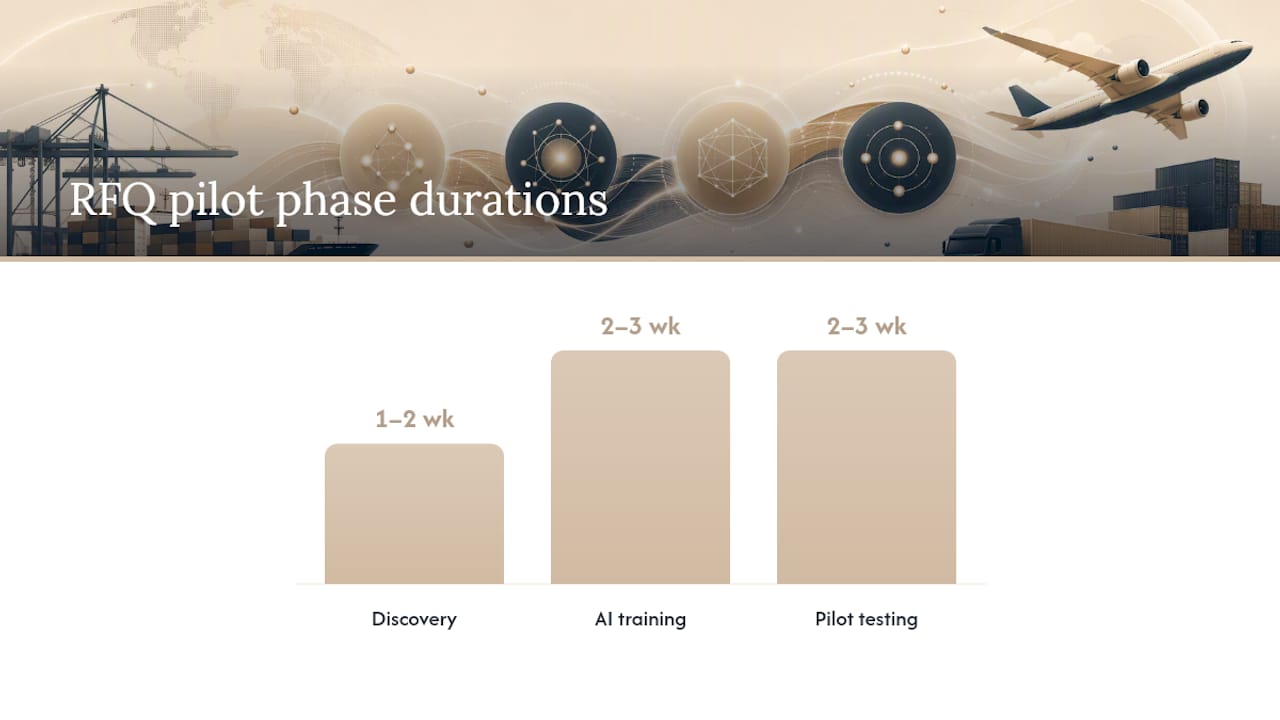
A pilot for RFQ email automation typically runs 6 to 10 weeks, considerably faster than a full TMS replacement project, because you are layering a specialized tool on top of what you already run rather than migrating your operation onto something new.
- Discovery (1 to 2 weeks). Map which inboxes receive RFQs, pull a representative sample of real requests, and inventory your existing rate sources and margin rules.
- AI training (2 to 3 weeks). Label sample emails and attachments, configure your business rules, and define what counts as an exception that needs a human.
- Pilot testing (2 to 3 weeks). Choose two or three high-volume lanes, run the system with a human reviewing every output, and track your core KPIs while you tune it.
- Rollout. Expand to additional lanes, set service-level agreements for how exceptions get handled, and hand steady-state operation over to your ops team.
That 6 to 10 week window lines up with the phased timeline Forwarding Copilot documents for RFQ automation specifically, as distinct from a broader TMS deployment.
Pro Tip: Assign one experienced quoting agent as the pilot champion before you start training the AI. That person’s judgment calls on edge cases become your labeled training data, and their buy-in during week one usually decides whether the rest of the team trusts the tool by week eight.
Staff the project with someone who owns pricing rules, someone who owns the TMS relationship, and one operator willing to flag every mistake during the pilot window.
How Does RFQ Automation Connect To Your TMS?
Three integration patterns cover most deployments: a direct API write into the TMS, a middleware layer that translates and routes data between systems, or a simpler file-import process for teams not ready for a live connection. Because RFQ automation is designed to sit alongside your existing tools rather than replace them, most implementations connect to current rate tables and carrier APIs without requiring a system swap.
Before you commit to a vendor, work through these questions:
- Which TMS platforms and carrier APIs does the tool already support out of the box?
- What specific data objects does it write, and does it push full quote records or partial fields?
- What happens when an entry needs to be rolled back, and how are errors surfaced to a human?
- How does it handle optional or variant fields, like special commodity codes or non-standard weight units?
- Is RFQ data stored transiently for processing or persisted long-term, and how does that fit your compliance obligations?
Getting clear answers here upfront saves you from discovering integration gaps three weeks into a pilot, when switching vendors costs far more than switching early would have. A tool like Logentic’s AI agent on top of your TMS is built specifically to avoid that migration burden.
What Mistakes Undermine RFQ Automation Accuracy?
Three failure modes show up repeatedly. Training the AI on too narrow a sample of RFQs leaves it blind to the messy real-world variations your inbox actually receives. Leaving pricing rules uncodified means the system either guesses or defers everything, defeating the purpose. And automating exception handling too aggressively, before the model has proven itself, risks sending out quotes nobody checked.
- Start on your highest-volume lanes, where patterns are clearest and mistakes are cheapest to catch.
- Codify your margin and accessorial rules before you turn on broad automation, not after.
- Keep a human-in-the-loop threshold until exception rates fall to a level you’re comfortable with.
- Build an exceptions dashboard and revisit it weekly during the pilot, then monthly once stable.
- Test against a holdout set of RFQs the system has never seen before you allow any auto-confirmation.
Pro Tip: Price logic should be finalized before extraction accuracy becomes your focus. An automation layer without codified margin rules can lock in inconsistent pricing across lanes just as fast as it locks in consistent ones.
Why Adoption Depends More on People Than On the Model
The technology rarely fails first. Adoption stalls when agents feel bypassed instead of supported. Pick a pilot champion, run short hands-on training sessions instead of one long rollout meeting, and align exception SLAs with what your team can realistically review. Publicize the first clean win, whether that’s a lane where time-to-quote dropped or an agent who quoted double their usual volume, and use it to justify expanding scope. Teams that treat the pilot as a partnership between agents and the model outperform teams that treat it as a replacement announcement.
— Bogdan
See How Logentic’s Alex Agent Handles Your RFQ Inbox
Logentic is built for forwarders who want RFQ automation without ripping out the TMS they already rely on. Its AI agent, Alex, reads incoming emails, extracts the shipment data, and writes it into your TMS in about eight seconds, a claim Logentic backs with its own product documentation and one worth verifying against your own volume during a pilot.

Because Alex sits on top of systems you already run, most teams move from first conversation to a working pilot in a matter of weeks, not months, testing accuracy on real lanes before expanding scope. If your quoting bottleneck is buried in your inbox rather than your TMS, Quote Automation is the fastest place to start. For teams also drowning in bills of lading and CMRs alongside RFQ traffic, B/L & CMR processing tackles the same extraction problem on the documents. Request a pilot and get a real answer on your own volume within weeks, not quarters.
Sources
For a deeper look at the mechanics behind automated freight quoting, LoadStop’s breakdown of inbound RFQ automation covers margin protection during automation. Forwarding Copilot’s comparison of TMS versus RFQ automation clarifies where each tool fits. For operational efficiency context beyond RFQs specifically, see this logistics optimization overview.
- How to Automate Inbound Freight Quotes Without Losing Margin | LoadStop
- TMS vs RFQ Automation: Which Solution for Freight Forwarders? | Forwarding Copilot
FAQ
What Is Rate Request Email Automation?
It’s software that monitors your inbox for incoming RFQ emails, extracts the shipment details using AI, and generates a quote automatically, often writing the result straight into your TMS. The goal is to replace manual data entry with structured extraction, cutting a multi-minute task down to seconds.
How Long Does an RFQ Automation Pilot Take?
Most pilots run 6 to 10 weeks, split roughly across discovery, AI training, and pilot testing phases. That’s considerably faster than a full TMS replacement project, since you’re adding a focused layer rather than migrating your core system.
Does RFQ Automation Replace My TMS?
No. It’s designed to work alongside your existing TMS, connecting through APIs, middleware, or file imports to feed structured quote data in. Logentic’s approach, for example, layers its Alex agent on top of the TMS you already use rather than requiring a system swap.
What Does Logentic Charge for Email Automation?
Logentic doesn’t publish fixed pricing for its email automation service on its site. Current pricing details are available by contacting Logentic directly.
Can Automated Extraction Handle PDF and Excel Attachments?
Yes. Document AI and natural language processing tools parse unstructured attachments, including PDFs, Excel files, and scanned documents, extracting fields like origin, destination, weight, and commodity type into structured data the quoting engine can use.
Recommended
Want to see how Logentic automates this work?
Book a call →