Cut Customs Delays in 30 Days With Pre Alert Automation for Logistics
Cut customs clearance delays with pre alert automation. Use an ops checklist and run a 30 day pilot with Logentic's email to TMS AI agent to validate results.

Yes, automate your pre-alerts. The best approach chains four steps: ingest documents from email, EDI, and carrier APIs, extract and validate the required fields, route exceptions to a human queue, and push clean records straight into your TMS. Freight teams running this pattern see faster clearance, fewer document errors, and less exposure to demurrage from missed deadlines.
TL;DR:
- Automating pre-alert document ingestion, validation, and routing reduces processing time and errors, leading to faster customs clearance and fewer delays.
- Key fields for automation include bill of lading or airway bill number, ETA, container details, HS codes, weights, and relevant reference numbers like MRN.
- Early and accurate pre-alert submissions improve risk assessment with customs, decreasing the likelihood of inspections and last-minute rework costs.
- Automation success depends on running pilots on steady, lane-specific templates and setting clear KPIs such as document correctness and processing time.
- Integrating AI-driven extraction with existing systems enables real-time data flow into TMS and customs platforms, significantly cutting manual effort and error rates.
Table of Contents
- What Goes Into a Freight Pre-Alert?
- Why Pre-Alerts Matter More Than Most Teams Realize
- Pre-Alert Verification Workflow: A Step-by-Step Checklist
- How Automation Changes the Pre-Alert Workflow
- How to Pilot and Scale Pre-Alert Automation
- An AI Agent That Reads Email and Writes to the TMS
- When to Automate Aggressively and When to Hold Back
- Start a Pre-Alert Automation Pilot With Logentic
- Sources
- FAQ
What Goes Into a Freight Pre-Alert?
A pre-alert is the shipment’s paperwork sent ahead of arrival so customs, drayage, and warehouse teams can prepare before the container or truck shows up. The package usually includes the bill of lading (draft or final), the air waybill (AWB, HAWB, or MAWB for air freight), the commercial invoice, the packing list, and a certificate of origin when the trade lane requires one. Road shipments add a CMR; Ro-Ro ferry crossings require a movement reference number (MRN) bundled into a pre-boarding notification, without which a vehicle can be denied boarding, according to iCustoms’ iPBN documentation.
The fields that actually matter for automation are narrower than the document set:
- B/L or AWB number
- ETA and ETD
- HS code and container numbers
- Weight and volume
- Consignee and notify party
- MRN, where applicable
Lead times differ by mode. Ocean pre-alerts typically need to land well in advance of vessel arrival; air and Ro-Ro windows have shorter lead times. Your validation SLA should scale with that window. A B/L and CMR processing setup that flags a missing certificate of origin two days out is useful. One that flags it two hours before gate-in is not.
Why Pre-Alerts Matter More Than Most Teams Realize
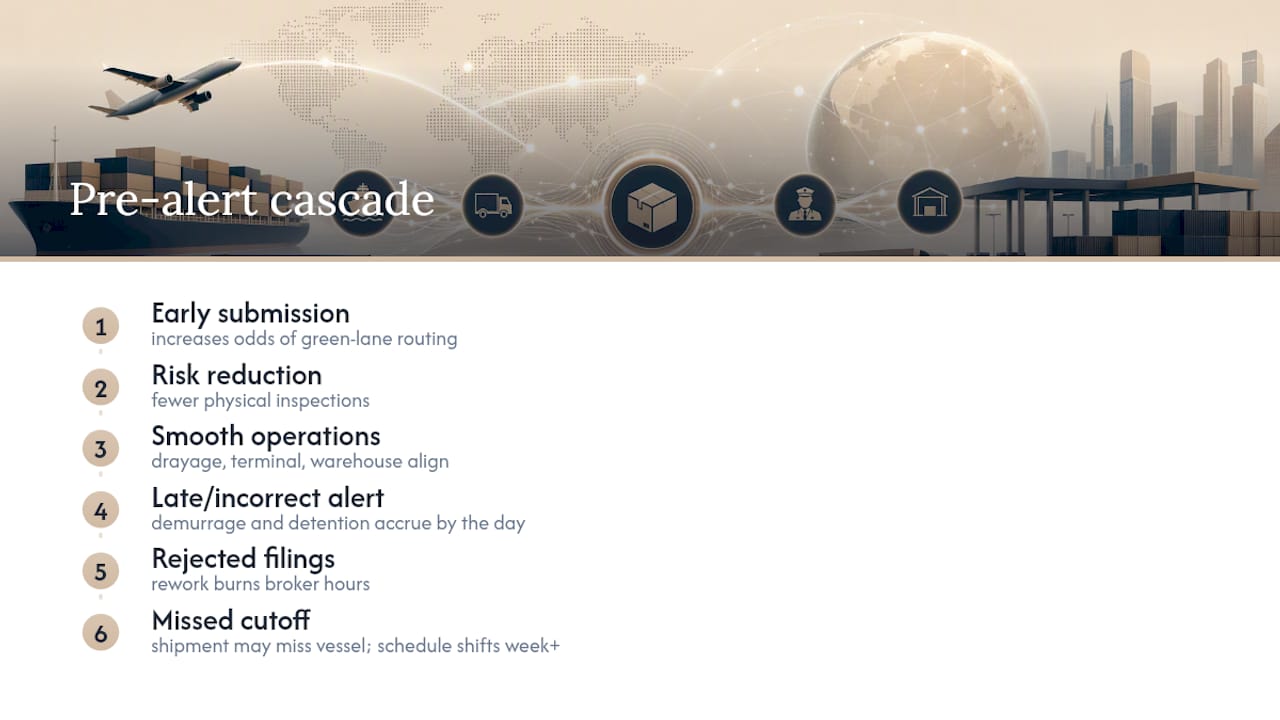
Customs agencies use pre-arrival data for risk assessment. Submitting import data early, as encouraged under CBP’s Importer Security Filing program, increases the odds of green-lane routing and fewer physical inspections. That single benefit cascades into everything downstream: drayage gets scheduled with confidence, terminal handling avoids last-minute rebooking, and warehouse crews staff correctly instead of guessing.
A late or incorrect pre-alert has a cost you can put a number on. Demurrage and detention charges accrue by the day once a container sits past its free time. Rework on rejected filings burns broker hours. In the worst case, a missed cutoff means the shipment doesn’t make its vessel at all, and the whole schedule shifts by a week or more. None of this is exotic risk. It’s the routine cost of a manual process that depends on someone reading an email correctly under time pressure.
Pre-Alert Verification Workflow: A Step-by-Step Checklist
Every pre-alert failure traces back to one of five breakdowns: a document arrives late, a field gets misread, a required certificate is missing, nobody catches the mismatch until customs does, or the correction loop runs out of time before the deadline. Build your automation rules around closing each gap.
- Ingest. Pull documents from every channel your partners actually use. Email is still dominant, but EDI feeds, shipper portals, and carrier APIs all need a parsing path in.
- Extract and match. Map extracted fields against the existing booking or TMS record. A B/L number that doesn’t match an open booking is your first automated red flag.
- Validate. Run field-level checks. Is the MRN formatted correctly? Does the HS code exist? Is the packing list weight consistent with the commercial invoice?
- Decide. Three outcomes only: accept and route, request a correction from the sender, or escalate to a human exceptions queue.
- Escalate on a clock. Set a hard wait time for a corrected document; the Tier2 Systems ops workflow guide recommends fixed deadlines tied to vessel ETA rather than open-ended follow-up. Past that clock, trigger your contingency, whether that’s an alternate release procedure or a manual override.
Pro Tip: Set your escalation clock to the shortest lead time in your lane mix, not the average. A rule built around a 5-day ocean window will blow through a same-day air deadline before anyone notices.
How Automation Changes the Pre-Alert Workflow
Manual pre-alert handling means someone opens an email, reads a PDF, and retypes numbers into a TMS. Automation replaces that chain with four connected pieces.
- Document AI reads the incoming email and attachments, pulling B/L or AWB numbers, MRNs, invoice totals, certificate of origin data, and packing list line items without a human touching the keyboard.
- A validation engine applies a configurable ruleset: required fields present, formats correct, cross-document totals reconciled.
- Triggers and routing fire automatically once validation passes. A clean record can notify the broker, schedule drayage, or kick off a customs pre-filing in the same motion, similar to the embedded dispatch pattern described in Riege’s automated pre-alert feature, which keeps communications inside the shipment file for auditability.
- Confidence thresholds decide what goes straight through versus what needs a second look, the same staged-trigger logic used in event-notification systems more broadly, per patent filings on pre-alert trigger design.
The integration layer matters as much as the AI. Extracted data needs to flow into your TMS, sync with Track & Trace systems, and reach customs platforms like Portbase directly. Carriers are also moving the underlying documents toward structured formats: DCSA member carriers have committed to a fully standardized electronic bill of lading by 2030, which will make extraction more reliable over time, but plan your parsers to handle PDFs and scanned paper for years yet.
How to Pilot and Scale Pre-Alert Automation
Start with discovery, not deployment. Map your actual data sources, sample document volume on two or three representative lanes, and note where document templates are inconsistent. Medium-volume lanes with steady templates make the cleanest pilot, since fewer parser exceptions mean a clearer read on your baseline.
- Set targets before you build. Aim for a high automated acceptance rate and a defined improvement in average processing time.
- Run the pilot in parallel. Keep manual processing running alongside the automated path for four to six weeks so you can compare outcomes directly, not just trust the new system.
- Roll out lane by lane. Expand only after the pilot lane hits target, adding integrations and training ops staff on exception handling as you go.
- Set governance early. Decide who owns rule changes before scaling, so validation logic doesn’t drift without oversight.
| KPI | What it tells you |
|---|---|
| Document correctness rate | How often extracted data matches source without correction |
| Average processing time | Speed gain from ingest to TMS entry |
| Percent of alerts auto-routed | Automation coverage versus manual exception rate |
| Demurrage incidents | Direct financial impact of the rollout |
An AI Agent That Reads Email and Writes to the TMS
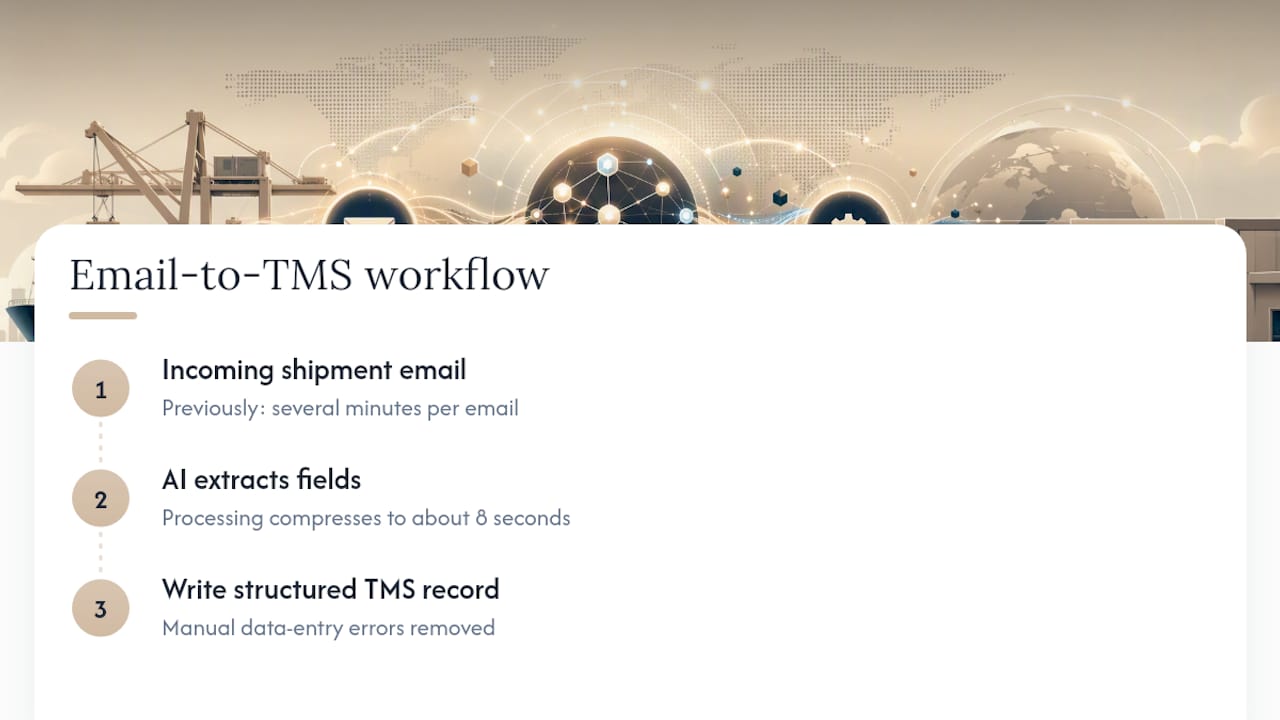
An AI agent illustrates the pattern in practice: it reads incoming shipment emails, extracts the relevant fields, and writes structured records directly into the TMS. Processing that once took several minutes per email compresses to about eight seconds, with manual data entry errors removed from that step entirely. It’s a concrete case of email automation applied to the exact ingest-and-extract stage every pre-alert workflow depends on.
When to Automate Aggressively and When to Hold Back
Automate the repeatable document flows first. Keep experienced staff on the edge cases. Pilot one lane for 30 to 60 days with clear KPIs before scaling further.
— Bogdan
Start a Pre-Alert Automation Pilot With Logentic
A solution replaces the manual read-and-retype step in your pre-alert workflow with an AI agent that extracts document data and writes it into your TMS in seconds instead of minutes, cutting the error rate that causes clearance delays in the first place.

If your team is still weighing whether to build custom parsing rules or bring in a dedicated tool, the fastest way to find out is a short, low-risk test. Run a 30-day pilot on one lane, measure the automated acceptance rate against your current manual baseline, and see the processing-time difference directly. Explore Logentic’s email automation and request a pilot to validate the numbers on your own shipment volume before committing to a full rollout.
Sources
- DCSA: Commitment to standardized electronic bill of lading by 2030
- Freight pre-alert documents: an ops workflow guide — Tier2 Systems (2026-04-23)
- iPBN – Automated Pre-Boarding Notification Software | iCustoms
FAQ
What Is a Pre-Alert in Freight Shipping?
A pre-alert is a notification, sent ahead of a shipment’s arrival, that bundles the key documents and data (B/L or AWB number, ETA, HS code, consignee details) so customs, drayage, and warehouse teams can prepare before the cargo shows up.
What Documents Are Included in a Pre-Alert?
The standard set includes the bill of lading or air waybill, the commercial invoice, the packing list, and a certificate of origin, with a CMR for road freight and an MRN bundle for Ro-Ro crossings, according to Tier2 Systems’ ops workflow guide.
What Are Alerting Mechanisms in Pre-Alert Systems?
Alerting mechanisms are the rules and triggers that decide what happens after a document is validated, such as auto-notifying a broker, scheduling drayage, or escalating a mismatched field to a human reviewer.
How Does Pre-Alert Automation Reduce Demurrage Risk?
Automation validates documents and pushes clean data into the TMS fast enough to hit customs deadlines consistently, which cuts the late or rejected filings that cause containers to sit past free time and accrue demurrage charges.
Can Pre-Alert Automation Integrate With Existing TMS and Customs Platforms?
Yes. Tools built for this connect to TMS platforms, carrier tracking APIs, and customs portals like Portbase, so validated data flows directly into the systems your team already uses instead of sitting in email inboxes.
Recommended
Want to see how Logentic automates this work?
Book a call →