Save 12 Hours: Packing List Data Capture for Logistics Teams
How logistics teams use AI to extract packing list data, prepopulate ASN/WMS/TMS, reduce exceptions and dock idle time, and run a focused pilot.

Yes, AI-powered Document AI can extract and validate packing list data automatically, feeding it directly into customs, warehouse, and transport systems without manual re-keying. Automation is production-ready today, and it delivers structured line-item data, earlier ASN/WMS staging, lower exception rates, and faster customs preparation. The sections below walk through how the extraction works, which fields matter most, integration patterns, and a checklist for scoping a pilot.
TL;DR:
- Extracted packing list data can be fed into systems before goods arrive, reducing dock idle time and enabling faster customs clearance.
- Prioritized fields for extraction include item SKUs, shipped quantities, package weights, and carton numbers, which are critical for receiving and billing accuracy.
- System timing — processing data early, ideally pre-arrival — offers greater operational benefits than focusing solely on extraction accuracy.
- Automated data entry from documents scales without increasing staffing needs, significantly cutting manual labor costs and reducing errors.
- Integration patterns relying on API connections and real-time routing of low-confidence data to humans maximize the value of AI-driven packing list processing.
Table of Contents
- How Does AI-Powered Packing List Data Capture Work?
- Which Packing List Fields Should You Capture?
- Integration Patterns: Feeding Data Into Customs, WMS, and TMS
- What ROI Should You Expect From Automation?
- How Do You Plan a Pilot and Choose the Right Approach?
- Logentic’s Approach to Email-to-TMS Document Automation
- Why Integration Timing Matters More Than Extraction Accuracy
- Automate Your Packing List Processing With Logentic
- Sources
- FAQ
How Does AI-Powered Packing List Data Capture Work?
Packing list processing starts with intake. Documents arrive by email attachment, API upload from a supplier portal, or as scanned paper handed to a dock worker. A capable system accepts all three routes without forcing suppliers into a single template.
Once a document lands, preprocessing kicks in: image cleanup, page splitting, and layout detection identify where tables, headers, and line items sit on the page. This step matters more than most teams realize, because packing lists arrive in wildly inconsistent formats across suppliers. Document AI’s advantage over fixed-template OCR is that it interprets document meaning rather than matching against a rigid template, which means it survives a supplier switching their spreadsheet layout without breaking the extraction pipeline.
From there, the system performs the real extraction work:
- OCR and machine learning models pull text and numbers from tables, isolating individual line items even across multi-page documents
- Named entity recognition tags what each value actually represents (a quantity, a weight, a PO number) rather than treating everything as a flat string
- Reconciliation logic checks extracted lines against open purchase orders, ERP records, and master data
- Confidence scoring flags any field the model isn’t sure about, routing it to a human reviewer instead of pushing bad data downstream
The output typically lands as structured JSON or CSV, or pushes directly through an API into a WMS import queue or straight into the TMS. That last step is where the real time savings show up: no analyst retyping numbers from a PDF into a spreadsheet.
Which Packing List Fields Should You Capture?
Not every field on a packing list carries equal weight downstream. Prioritizing extraction around the fields that feed receiving, customs, and billing checks gets you the fastest return.
Item-level fields matter most for receiving accuracy: SKU or part number, item description, ordered versus shipped quantity, and unit of measure. A mismatch here is what triggers a receiving exception on the dock.
Package-level fields drive physical handling: carton number, pieces per carton, gross and net weight, and dimensions. Carton-level detail extraction lets a warehouse pre-stage pallet configurations before the truck even arrives.
Shipment metadata ties the document to the broader transaction: packing list number, associated PO numbers, shipper and consignee names, country of origin, and container numbers.
Derived or optional fields add value for specific workflows: EAN/GTIN codes, suggested HS-code candidates for customs, and marks-and-numbers references used in older paper-based trade lanes.
Here’s how those fields map to actual use: WMS receiving teams use ordered-versus-shipped quantities to auto-flag shortages, customs teams use gross weight to cross-check against declared values, and freight billing teams use carton counts to catch overcharges before they get paid. Extracted line items output as structured JSON or CSV, which is what makes this mapping possible without a second manual pass.
Integration Patterns: Feeding Data Into Customs, WMS, and TMS
Timing decides whether packing list data creates value or just moves the same manual work one step earlier. Two patterns dominate in production environments:
- Pre-arrival extraction. Advance packing lists sent by email get processed before the container reaches port, letting teams create ASN and WMS import records ahead of arrival. This is the single biggest lever for cutting dock idle time.
- Dock-time processing. Scanned paper lists handed over at receiving get run through the same extraction pipeline, then reconciled against whatever pre-staged data already exists from the advance list.
- Customs pre-population. Extracted weights, quantities, and item descriptions feed directly into T1, MRN, and HS-code preparation, cutting the manual lookup work customs specialists usually do line by line.
- System connectivity. Depending on what the receiving system supports, data moves through direct API push, JSON/CSV batch export, or middleware that bridges older WMS/TMS platforms without native API support.
- Exception routing. Anything below a confidence threshold, or any line that doesn’t match an open PO, routes to a human reviewer with a defined SLA, usually measured in minutes rather than hours.
Getting the sequencing right between steps 1 and 2 is where most of the operational gain lives. If pre-arrival data never reconciles against the dock-time scan, you’ve just built two disconnected systems instead of one reliable one.
What ROI Should You Expect From Automation?
Five KPIs tell you whether packing list automation is actually working: straight-through processing rate (STP%), average document processing time, exception rate, dock idle time, and customs clearance lead time. Track these before and after rollout, not just after.
Matching extracted lines against open PO data is the single highest-value validation step in the whole workflow, because it catches supplier shortages or over-shipments before goods ever reach the dock. Catching that discrepancy two days earlier, while the shipment is still in transit, gives purchasing time to react instead of scrambling at receiving.
The KPI that matters most for leadership conversations: exception rate. A lower exception rate translates directly into fewer people pulled off other work to manually chase down mismatched paperwork.
The cost case usually breaks down into three buckets:
- Labor time saved on manual data entry, multiplied by hourly cost of the staff previously doing it
- Fewer customs penalties from inaccurate declared weights or quantities
- Reduced freight billing chargebacks from catching carton-count discrepancies before invoices get approved
When presenting ROI to leadership, anchor the pitch on time saved times labor cost, plus faster throughput at receiving, plus avoided penalty exposure. Those three numbers are usually enough to justify a pilot on their own.
How Do You Plan a Pilot and Choose the Right Approach?
A tightly scoped pilot beats a sprawling one every time. Here’s the sequence that tends to work:
- Define pilot scope. Pick document types, a sample of suppliers, clear success metrics, and a realistic timeframe, usually one to three months.
- Check master data readiness. Your SKU catalog, PO linkage rules, and HS-code strategy need to be in reasonable shape before extraction accuracy can be measured fairly.
- Map integration requirements. List which connectors you need, what API specs your WMS/TMS expects, and what throughput and latency your volume demands.
- Confirm security and compliance. Ask about the vendor’s data processing agreement, encryption standards, audit logging, and where data physically resides.
- Build operational readiness. Design the human-in-the-loop workflow for exceptions, set SLAs for review turnaround, and plan training for the team that inherits the new process.
- Score vendors or internal builds against fixed criteria. Template independence, breadth of field coverage, batch and API throughput, availability of pre-built connectors to your specific WMS/TMS, and support responsiveness.
Pro Tip: Start the pilot with your most important suppliers by volume, not a random sample. Concentrating on the highest-volume SKUs surfaces measurable gains faster and gives you a cleaner before-and-after comparison than spreading the pilot thin across dozens of low-volume accounts.
Logentic’s Approach to Email-to-TMS Document Automation
Logentic’s AI agent, Alex, reads incoming logistics emails, extracts the relevant data, including packing list details, and enters it directly into the transport management system. Some deployments report processing times dropping from several minutes to just a few seconds per document, which is the kind of margin that changes how many shipments one operations team can actually handle in a day.
What Alex does in practice:
- Reads email attachments and inline data across CMRs, Bills of Lading, Air Waybills, packing lists, and customs certificates
- Extracts and validates data, then pushes it into the TMS without a human retyping a single field
- Integrates with existing systems, including CargoWise, Softpak, Descartes, and Portbase
- Supports customs preparation, including T1, MRN, and HS-code workflows that would otherwise require manual lookup
The core problem this solves isn’t just speed. It’s that manual data entry scales badly. Every new shipment volume increase used to mean hiring more people to do repetitive keying. An AI agent that reads and enters data in seconds removes that dependency entirely.
Why Integration Timing Matters More Than Extraction Accuracy
Most vendor pitches focus on extraction accuracy, the percentage of fields pulled correctly from a document. That number matters, but it’s not where most operations teams actually lose time. The bigger cost sits in when that extracted data reaches the system that needs it.
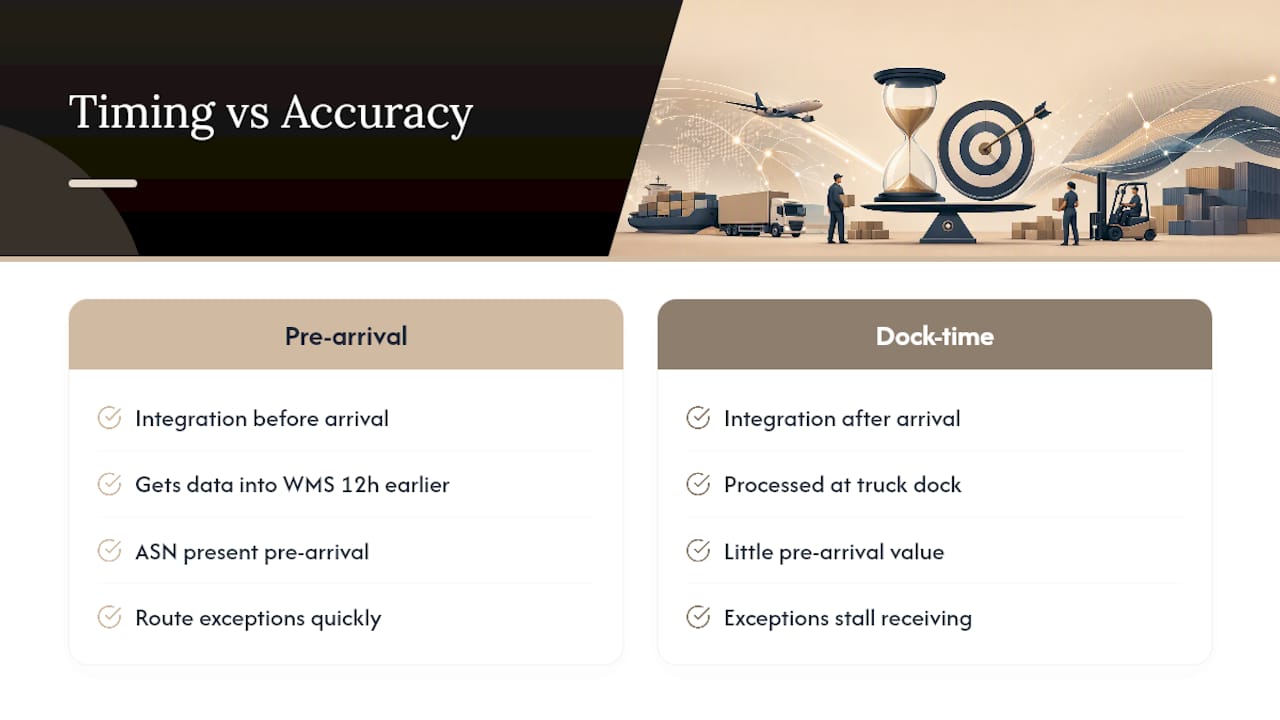
A packing list extracted with 98% field accuracy but processed only after the truck is already at the dock delivers almost none of the value a pre-arrival extraction would. The conventional advice treats accuracy as the finish line. It’s really the starting point. The real gain comes from pushing extraction earlier in the timeline, so ASN and WMS records exist before goods physically arrive, and from routing the inevitable exceptions to a human fast enough that they don’t stall receiving.
Teams evaluating this space should resist the urge to build a perfect extraction pipeline before addressing integration timing. A slightly less polished system that gets data into the WMS twelve hours earlier beats a highly accurate one that still waits for dock-time processing. Prioritize the pre-arrival workflow first, then tighten field-level accuracy once the timing problem is solved.
— Bogdan
Automate Your Packing List Processing With Logentic
Logentic replaces the manual keying that slows down freight forwarders and customs agents with an AI agent that reads emails and documents, including packing lists, and enters the data directly into your TMS. Instead of an analyst spending several minutes per document copying line items, PO numbers, and weights by hand, an AI agent can handle the extraction and entry much faster.

That speed compounds across a full day’s volume. Teams that once needed to hire additional staff to keep pace with growing shipment counts can instead handle more documents with the same headcount, since the bottleneck of manual data entry disappears. Such AI solutions often connect with existing logistics systems, enabling rollout without replacing current infrastructure.
If your team is still re-keying packing list data from supplier emails into your TMS by hand, request a walkthrough of Logentic’s email automation to see how the extraction and entry process works on your own document samples.
Sources
- Automate Packing List Data Extraction for Receiving | Lido
- Packing List Parser: Extract Data Automatically | ParserBee
- Document AI for Logistics — BLs, Invoices, Customs | WHIZTEC
FAQ
What Should a Packing List Include?
A complete packing list includes item-level detail (SKU, description, quantity, unit), package-level detail (carton count, gross and net weight, dimensions), and shipment metadata (packing list number, PO number, shipper, consignee, and country of origin).
How Do You Make a Packing List in Excel?
Building one manually in Excel means listing each item’s SKU, description, quantity, and weight in separate columns, then adding carton and shipment reference numbers. Most logistics teams now skip this manual step entirely by extracting the same fields automatically from supplier-submitted documents.
What Is a Packing List Document?
A packing list is a shipping document that itemizes exactly what’s inside a shipment, including quantities, weights, and package counts, and it’s used by customs, warehouse receiving, and freight billing teams to verify what actually arrived against what was ordered.
How Do You Generate a Packing List Automatically?
Document AI systems extract packing list data from emailed PDFs, scanned paper, or API uploads, then output structured JSON or CSV that populates a WMS, TMS, or customs system without manual entry. Platforms like Logentic apply this same extraction approach to route data straight into a TMS after reading it from an incoming email.
What’s the Difference Between OCR and Document AI for Packing Lists?
Template-based OCR reads text but often breaks when a supplier’s layout changes, while Document AI interprets document meaning across varying layouts and matches extracted fields against shipment and master data automatically.
Recommended
Want to see how Logentic automates this work?
Book a call →