Fix the Workflow First: Automated Data Entry for Logistics Teams
An operations first plan to cut exceptions and prove automated data entry ROI in a 60–90 day pilot, with pilot scoring and Logentic implementation examples.

Automated data entry lets logistics teams cut manual keying, catch errors before they cause exceptions, and process substantially more shipments without adding headcount. It runs on three technology layers, OCR/IDP, RPA, and AI agents, each of which needs a clean write-back path into your TMS, WMS, or ERP. None of it pays off without upfront data cleanup and a scoped 60 to 90 day pilot to prove the model before you scale.
TL;DR:
- Automating data entry reduces manual errors that can cause costly downstream issues like misrouted pallets or customs holds, especially for high-volume documents like BOLs and PODs.
- Successful pilots require a 60 to 90 day scope, baseline KPI measurements, and careful workflow redesign to avoid automating broken processes.
- Integration and observability, including structured error handling and real-time monitoring, are critical for sustaining automation performance and diagnosing issues quickly.
- The workforce shifts from data entry to exception review and governance, demanding staff with technical fluency and auditing skills instead of typing expertise.
- Building in-house or using AI solutions like Logentic’s platform accelerates adoption and ensures support for critical documents, especially in customs-heavy operations.
Table of Contents
- Why Accurate Data Entry Matters in Logistics Operations
- Benefits and Measurable ROI: the KPIs You Must Track
- Technology Options: OCR/IDP, RPA, AI Agents, and Integrations
- Which Documents Should You Automate First?
- How to Implement Automated Data Entry: Pilot to Scale
- What a Real Automation Setup Looks Like in Practice
- Adoption Checklist and Common Pitfalls
- Impact of Automated Data Entry on Workforce Roles and Required Skills
- The Real Bottleneck Isn’t the Technology
- Start Your Automated Data Entry Pilot With Logentic
- Sources
- FAQ
Why Accurate Data Entry Matters in Logistics Operations
A single mistyped SKU on an intake form does not stay a single mistake. It becomes a misrouted pallet, a billing dispute, or a customs hold three steps downstream, and by the time someone catches it, three different departments have already touched the file. That is the real cost of manual entry: not the minutes spent typing, but the hours spent unwinding what typing got wrong.
Manual entry still dominates more of the logistics back office than most operations leaders admit. It shows up in:
- Emailed booking requests and order confirmations that someone reads and retypes into the TMS
- Scanned Bills of Lading and Proofs of Delivery that get keyed by hand from a PDF
- EDI fallbacks, when a trading partner’s feed breaks and someone processes the exception manually
- Spreadsheets passed between warehouse, dispatch, and finance teams
- Portal uploads where carrier or customs data has to be copied field by field
Academic and industry literature on automation in logistics consistently finds that systems like ASRS and AGVs improve operational accuracy and throughput precisely because they remove that repeated human handoff. Every point where a document changes hands manually is a point where an error can enter the record. Fixing entry at the source, rather than auditing it after the fact, is what actually reduces exception volume. Exception handling is expensive labor; correct-the-first-time entry is comparatively cheap software.
Benefits and Measurable ROI: the KPIs You Must Track
The benefits of automated data entry are not abstract. They show up as fewer rejected orders, faster acknowledgment times, and staff who spend their day resolving exceptions instead of retyping fields that a document already contains.
Statistic callout: A 2025 study of 181 supply chain managers found that automation had the strongest positive effect on supply chain performance of any factor tested, with data integration close behind, and that the payoff is largest when automation is embedded in a broader digital transformation effort rather than deployed as an isolated tool.
Before you automate anything, establish a baseline. Track these six metrics for at least two weeks under your current manual process:
- Error rate — the percentage of entries requiring correction after initial keying.
- Orders processed per hour — per operator, to size your throughput ceiling.
- Time to acknowledgment — how long between document receipt and confirmed entry.
- Exception rate — the share of shipments that trigger manual intervention downstream.
- Cost per document — labor time multiplied by loaded hourly cost.
- Incident response time — how long a bad entry takes to detect and fix.
A meaningful pilot improvement is not a marginal dip in error rate. If automation is working, error rate and time-to-acknowledgment should both drop sharply within the first pilot cycle, and exception rate should follow within a month as clean data works through downstream systems. If none of those four move, the problem usually is not the technology. It is the document set you chose or the workflow you automated around.
Technology Options: OCR/IDP, RPA, AI Agents, and Integrations
Three technology categories handle automated data entry, and they solve different parts of the problem. Mixing them up is the most common reason pilots underperform.
OCR and IDP (Intelligent Document Processing) extract text and structured fields from scanned or PDF documents, then assign a confidence score to each extracted field. A confidence score below your threshold routes the document to a human reviewer instead of writing bad data straight into your system. This layer is strongest on documents with a consistent field layout, like standardized invoices, and weaker on freeform emails or handwritten notes.
RPA (Robotic Process Automation) automates tasks at the user-interface level, clicking through the same screens a person would. It is fast to deploy against a stable, unchanging interface but brittle: a vendor updates their portal layout and the bot breaks until someone rebuilds the script. RPA works best for well-defined, repetitive UI tasks, not for judgment calls.
AI agents go further than either. They can read an unstructured email, determine what kind of request it is, extract the relevant fields, and decide the correct downstream action, whether that is entering a booking, flagging a discrepancy, or requesting missing information. Agent orchestration, coordinating several purpose-built agents around a shared workflow, generally outperforms rigid cron-based batch jobs because it can react to events in near real time rather than waiting for the next scheduled run.
Whatever combination you pick, the integration layer decides whether it holds up in production:
- Confirm write-back endpoints exist for your TMS, WMS, or ERP, not just read access.
- Map every carrier API you depend on, including authentication and rate limits.
- Build retry and backoff logic so a temporary outage does not silently drop a shipment.
- Define structured error handling so failures are visible, not swallowed.
Which Documents Should You Automate First?
Not every document type deserves a pilot slot. Score each candidate on three criteria before you commit resources:
- Volume — how many of this document type do you process weekly? Low volume means slow proof of ROI regardless of how well the automation performs.
- Downstream impact — how many other systems or teams touch this document after entry? Higher impact means a bigger error blast radius, and a bigger win when you remove it.
- Structural consistency — does the layout vary by sender, or is it reasonably standardized? Consistent structure means higher extraction confidence out of the box.
Proofs of Delivery, Bills of Lading, invoice matching, and email order intake tend to score highest across all three criteria, which is why they are the standard starting points for most automated data entry programs. PODs and BOLs are high volume and directly tied to billing disputes when they are wrong. Invoice matching has clear downstream financial impact. Email order intake often carries the highest volume of any single workflow in a forwarding operation.
Pro Tip: Run your first pilot on the single document type with the highest volume, not the one that looks most impressive. A boring, high-volume win builds internal buy-in faster than a sophisticated pilot nobody notices.
Set your pilot window at 60 to 90 days with a fixed scope, one document type, one workflow, and defined success thresholds tied to the KPIs from the previous section, before you touch a second document type.
How to Implement Automated Data Entry: Pilot to Scale
Automation applied to a broken workflow just automates the breakage faster. Redesign the workflow first: map every touchpoint, every handoff, and every person who currently owns a step, before you decide what to automate around it.
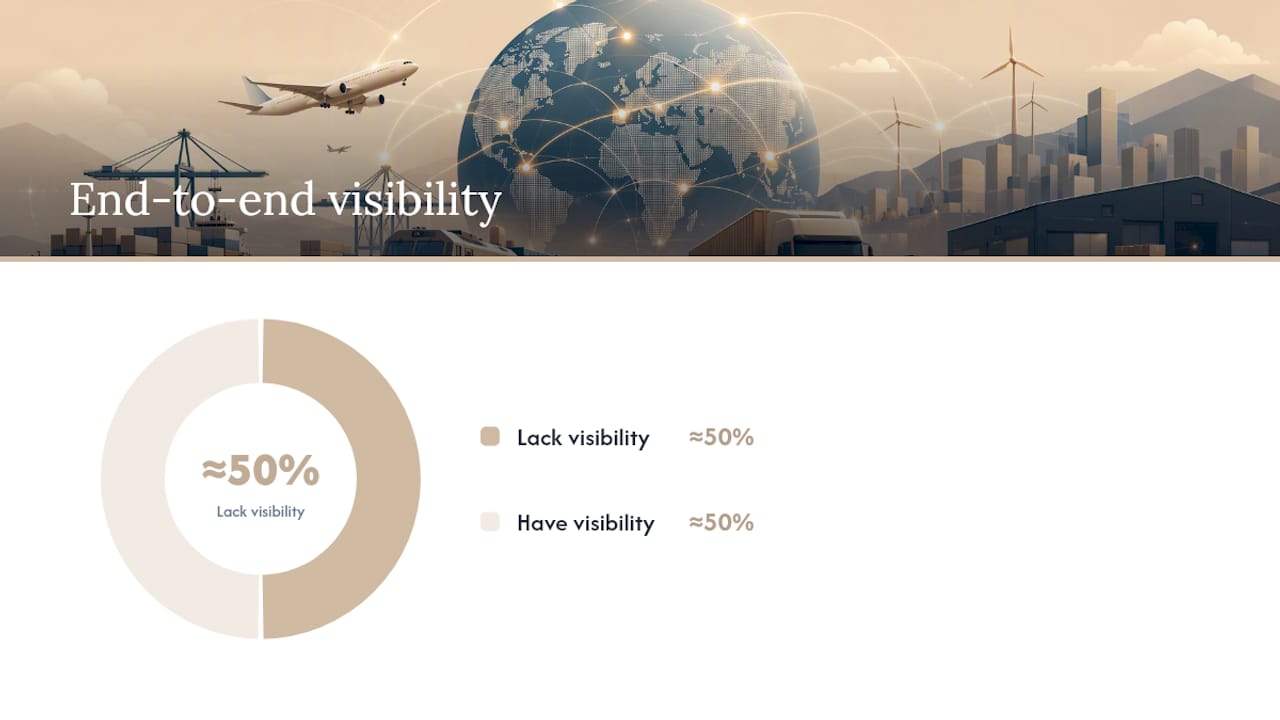
Once the workflow is mapped, build the data foundations. That means canonical schemas (a single definition of what a “shipment record” contains, regardless of source), master-data cleanup for customer and carrier records, and a named owner for each data domain. Industry analysis is blunt about the consequence of skipping this: roughly half of logistics companies still lack end-to-end visibility into their own data, which is exactly the gap that turns a promising AI pilot into an expensive disappointment.
Your integration checklist should cover:
- Write-back endpoints tested against your live TMS or WMS, not a sandbox copy
- Carrier API credentials, rate limits, and failover behavior documented
- Authentication, retry, and backoff logic built in before go-live, not added after the first outage
- Structured error handling that routes failures to a visible queue instead of a silent log
Statistic callout: In one documented case, agent orchestration cut data latency from 30 minutes to under 2 seconds compared with a legacy batch pipeline, and incident response time dropped correspondingly once observability and automated recovery paths were in place.
That observability piece matters more than most rollout plans admit. Build drift detection so you know when extraction accuracy degrades before it causes damage, and set an alert hierarchy tuned to roughly 5 to 15 genuinely actionable alerts per day at launch. More than that and your team tunes out the alerts entirely. Pair it with a defined human-in-the-loop threshold, so anything below your confidence bar routes to a person automatically, and an audit log covering every automated decision. That audit trail is what satisfies compliance review and what tells you exactly when to trigger a model retrain.
What a Real Automation Setup Looks Like in Practice
A typical automated data entry setup for a forwarding operation follows a five-stage pattern: ingest the document or email, normalize its fields against a canonical schema, enrich it with reference data (customer records, HS codes, carrier details), write it back into the TMS, and run a watchdog process that checks the whole chain kept working.
A typical deployment pattern for an AI agent in logistics automation follows that structure closely, reading incoming operational emails, extracting relevant shipment data, and entering it directly into the TMS, cutting a process that historically took several minutes down to roughly eight seconds per message. The document types it handles, Bills of Lading, CMR waybills, and Proofs of Delivery, are the same high-volume, high-impact categories the pilot-scoring method above consistently surfaces as strong starting points.
Observability is what separates a pilot that survives contact with production from one that quietly breaks a month in. A watchdog agent that flags a stalled write-back before a shipment misses its cutoff is worth more than another point of extraction accuracy.
Guardrails matter as much as the automation itself:
- Set a hard human-review threshold for any extraction confidence below your defined cutoff.
- Apply extra scrutiny to customs filings, where regulatory exposure is higher than a routine booking error.
- Log every automated decision for audit, and revisit the threshold after the first full pilot cycle, not before.
Adoption Checklist and Common Pitfalls
Before launch, confirm four things: baseline KPIs are measured, a data owner is named for each domain, pilot scope is written down and fixed, and every integration touchpoint is mapped end to end.
Most rollout failures trace back to a short list of predictable mistakes:
- Alert fatigue from an untuned monitoring setup that fires on everything
- Automating a workflow nobody redesigned first, which just moves the breakage faster
- Skipping authentication and retry handling, so the first API hiccup causes a silent failure
Pro Tip: Schedule your first KPI review at the 30-day mark of the pilot, not at the end. Catching a stalled metric halfway through gives you time to fix it before the 90-day decision point arrives.
After rollout, set a recurring KPI review cadence, document an expansion plan for the next document type, and build retraining triggers into your governance process so accuracy does not quietly drift for months before anyone notices.
Impact of Automated Data Entry on Workforce Roles and Required Skills
Automated data entry does not eliminate the operations role. It changes what the role spends its day doing. Staff who previously keyed data from PDFs into a TMS shift toward reviewing flagged exceptions, managing the confidence thresholds that route work to them, and handling the judgment calls that automation is not built to make.
That shift demands a different skill set than the one most logistics teams hired for. Reading a confidence score and deciding whether to trust it is a different task than typing a field correctly. Teams need people comfortable auditing automated decisions, spotting drift in extraction accuracy before it compounds, and escalating governance questions, like when a customs document needs a human sign-off regardless of confidence score.
For managers, this means the hiring conversation changes too. Instead of scaling headcount linearly with document volume, you are scaling review capacity and technical fluency. A smaller team that understands how the automation reasons through a document, and where it is likely to be wrong, will outperform a larger team of pure data-entry staff every time volume spikes. Training existing staff into that reviewer and exception-handler role, rather than assuming automation makes the role redundant, is generally the faster and lower-risk path to scale.
The Real Bottleneck Isn’t the Technology
Every vendor pitch in this space leads with extraction accuracy and speed. Those numbers matter, but they are not where most automation projects actually fail. They fail because nobody redesigned the workflow before wiring automation around it, or because observability and governance got treated as an afterthought instead of a launch requirement.
A reference implementation that shows the full pattern, ingest, normalize, enrich, write-back, watchdog, is worth more to a skeptical operations manager than any accuracy percentage., and.
— Bogdan
Start Your Automated Data Entry Pilot With Logentic
Some AI-based solutions provide logistics teams a faster path to automated data entry than building an in-house integration project from scratch. Such AI agents can read incoming emails and documents, including Bills of Lading, CMR waybills, and Proofs of Delivery, and write the extracted data directly into existing TMS systems, without requiring replacement or migration of those systems.

A pilot typically follows the same three-stage path outlined above: a short discovery phase to map your highest-volume document type, a scoped pilot to prove accuracy and speed gains against your baseline KPIs, and a scale-up once those thresholds hold. Logentic’s email automation handles the intake side, while its B/L and CMR processing covers the document types most pilots start with. Dutch and European customs document support comes built in, so customs-heavy operations do not need a separate integration project to get started.
If you are ready to see how an eight-second entry time compares to your current process, get in touch about a freight forwarder software pilot and set your own 60 to 90 day proof point.
Sources
- The Impact of Digital Technology, Automation, and Data Integration on Supply Chain Performance: Exploring the Moderating Role of Digital Transformation
- AI and Data in logistics: optimising modern supply chains
- From Batch to Real-Time: A Logistics AI Agent Orchestration Case Study | ECOA AI
- Relevant ScienceDirect article on automation in logistics
FAQ
What Is Data Entry in Logistics?
Data entry in logistics means transferring information from a document, email, or system, like a Bill of Lading, a booking request, or a customs form, into an operational system such as a TMS or WMS. It has traditionally been done manually, which is exactly the step automated data entry logistics tools are designed to replace.
What Is Automated Logistics?
Automated logistics describes the use of software and AI to handle repetitive operational tasks, including data entry, document processing, tracking, and customs preparation, without manual intervention at every step. It typically combines OCR/IDP for extraction, RPA for task-level actions, and AI agents for decisioning across the workflow.
What Are Some Examples of Automation in Logistics?
Common examples include AI agents that read emailed booking requests and enter shipment data into a TMS, OCR systems that extract fields from scanned PODs and BOLs, and automated tracking tools that notify customers of shipment status without a manual update. Logentic’s email-to-TMS entry, which brings processing time down to roughly eight seconds per message, is one applied example.
Will Data Entry Be Replaced by AI?
Routine, high-volume data entry, like keying fields from a standardized document, is already being automated by AI agents and IDP tools. The human role is shifting toward reviewing flagged exceptions and low-confidence extractions rather than disappearing entirely, since judgment calls and compliance decisions still need a person in the loop.
Recommended
Want to see how Logentic automates this work?
Book a call →