Commercial Invoice Extraction: Map Three Supplier Templates for TMS
Prepare commercial invoice data for customs and TMS with concrete field schemas, reconciliation rules, security controls, and a 30 to 90 day pilot plan.

Commercial invoice extraction converts a free-form PDF or scanned invoice into a structured, validated payload, typically JSON or CSV, that drops straight into a Transport Management System and a customs filing without a human retyping a single field. Done right, it cuts manual entry time, catches the errors that trigger customs holds before they reach a broker, and gets shipments into entry filing faster. Logentic and similar platforms build this into an AI automation layer that sits between the inbox and the TMS.
TL;DR:
- Automated invoice extraction requires capturing all key header and line-item fields, including HS codes and customs values, to avoid manual lookups.
- The effectiveness of extraction depends on handling multi-language, diverse templates, and detecting layout drift with Document AI rather than rules-based OCR.
- Validation must include automatic checks for arithmetic consistency, ISO code validation, and an audit trail with document hashes and parser versions.
- Scaling the system involves modular schemas for different document types and monitoring exception rates to manage template and volume growth effectively.
- Pilot projects should focus on the most error-prone suppliers over 30 to 90 days, measure KPIs like time per document and exception rate, and ensure data security during processing.
Table of Contents
- What Fields Does Commercial Invoice Extraction Need to Capture?
- OCR, Document AI, or Both: Which Extraction Method Actually Works?
- How Do You Validate Extracted Invoice Data Before Filing?
- How Do You Reconcile Invoice Data With Packing Lists and B/Ls?
- What Does an Invoice Extraction Pilot Checklist Look Like?
- How Do You Secure Commercial Invoice Data During Extraction?
- How Do You Train a Model for Commercial Invoice Extraction?
- Can Invoice Extraction Scale as Volume and Formats Grow?
- Author Perspective: What Changes on the Ground
- Pilot Logentic’s Approach to Commercial Invoice Extraction
- Sources
- FAQ
What Fields Does Commercial Invoice Extraction Need to Capture?
Customs and TMS systems don’t care about half an invoice. They need a specific header-plus-line-item schema, and missing even one field forces a manual lookup that defeats the purpose of automating in the first place.
At the header level, extraction needs to pull the invoice number, invoice date (normalized to YYYY-MM-DD), shipper or exporter, consignee or importer, sold-to or bill-to party, notify party, currency in ISO 4217 format, total invoice value, and the Incoterms with its named place. Skip the currency normalization step and a $10,000 line reads identically to a €10,000 line in your TMS import.
Each line item carries its own set of fields:
- Line number and supplier part number
- Description of goods
- Quantity and unit of measure
- Unit price and extended line value
- Supplier-stated HS code, if the invoice includes one
- Country of origin per line
- Gross and net weight per line, when shown
The schema should also carry metadata that has nothing to do with the goods themselves: a per-field confidence score, an immutable document hash, the parser version that produced the output, and a nested line_items array rather than a flat table. Projects that separate document classes with focused field schemas tend to produce cleaner, more reconcilable output than one-size-fits-all extraction. Customs-focused extraction also demands fields AP-invoice tools never touch. HS/HTS codes, declared customs value, and per-line origin can appear anywhere on the page, and a customs broker automation guide notes that a single filing often draws on more than 50 distinct data points spread across the invoice, packing list, and bill of lading.
OCR, Document AI, or Both: Which Extraction Method Actually Works?
The choice between OCR-with-rules and Document AI or LLM-based extraction comes down to how much your supplier base varies. A single importer with three suppliers on fixed templates can get by on OCR plus regex rules, cheap to build, brittle the moment a template changes. A forwarder handling dozens of trade lanes and half a dozen languages needs something closer to Document AI, which adapts to layout drift without a rules rewrite every quarter.
Line-item tables are where most extraction pipelines actually fail. Reconstructing a table from a scanned PDF means detecting column boundaries from spatial geometry, anchoring headers to their data columns, and clustering coordinates the way tools like pdfplumber do, rather than trusting whatever reading order the PDF’s text layer suggests. Per-field extraction on each line, instead of grabbing the whole table as one text blob, pays for itself the first time a supplier merges two columns into one.
- Run OCR preprocessing whenever the PDF has no embedded text layer (a giveaway: text selection fails in a PDF viewer)
- Detect scanned images by checking for a text layer before extraction starts, not after it fails
- Handle multi-language encodings explicitly. Latin-1 and UTF-8 invoices from the same supplier are more common than you’d expect
HS code classification remains a place where automation assists but rarely finishes the job. Custom-focused extraction workflows generally still route HS classification to a human validator, since a misclassified code is a compliance problem, not just a data problem.
Pro Tip: Test your extraction pipeline against your worst supplier’s invoice first, not your best one. If it handles the messiest template in your portfolio, everything else is easy.
How Do You Validate Extracted Invoice Data Before Filing?
Confidence scoring only works if low scores actually stop the pipeline. A “fail loudly” policy means any field below your accuracy threshold, or any value that looks anomalous against historical patterns, gets escalated to a human instead of getting silently submitted with a best guess. Submitting a guessed HS code or duty basis is how a five-minute exception becomes a two-week customs hold.
Several checks should run automatically on every extracted invoice:
- Arithmetic reconciliation: quantity multiplied by unit price should equal the extended line value, and lines should sum to the invoice total
- ISO currency and country code validation against the standard lists, not free text
- HS code format checks (digit count and structure, even before classification accuracy is verified)
- Weight and total cross-checks against what the invoice itself claims
None of this matters without an audit trail. Production-grade extraction systems bind every output to an immutable envelope: a SHA-256 hash of the source document, the parser version that generated the result, and an extraction timestamp. That combination is what lets you reproduce the exact same output from the exact same input months later, which matters enormously when a customs authority reopens a filing during an audit.
How Do You Reconcile Invoice Data With Packing Lists and B/Ls?
An invoice alone rarely matches the shipment it describes. Weights get transposed, consignee names get abbreviated differently across documents, and totals drift when a partial shipment splits a purchase order. Reconciliation means linking every document to a shipment ID and running the invoice’s declared weight, total value, and consignee name against the packing list and bill of lading before anything gets filed, flagging discrepancies for review instead of filing on faith.
That reconciliation works better when each document type has its own focused extraction schema rather than one generic parser trying to read invoices, packing lists, and B/Ls with the same rules. A demo from the Global Customs & Trade Forum shows this pattern directly: a commercial invoice mapped into a nested JSON object with shipper, receiver, line items, and classification codes, ready to feed a downstream system without reformatting.
Once validated, the payload needs to land somewhere useful:
- JSON or CSV for direct TMS import
- Excel exports for teams still reconciling manually during a transition period
- API or webhook delivery for real-time integration with platforms like CargoWise or Portbase
- ACE, CARM, or ABI-ready field mappings so customs brokers aren’t remapping columns by hand every filing
What Does an Invoice Extraction Pilot Checklist Look Like?
Before any automation goes live, build the groundwork:
- Create a field-mapping spreadsheet and an HS/HTS commodity-code mapping table, since guessing at mappings mid-pilot wastes the whole exercise
- Inventory every supplier invoice template you actually receive, across your busiest trade lanes and languages
- Set acceptance thresholds: a critical-field accuracy target, an exception-handling SLA, and KPIs like time per document, exception rate, and percent fully automated
- Run a time-boxed pilot, typically 30 to 90 days, then measure results against those KPIs before touching production integration
Short pilots focused on your most error-prone suppliers tend to show the fastest improvement in exception rate, since that’s where the manual process was already breaking down.
Pro Tip: Pick your three worst suppliers for the pilot corpus, not your three best. A pilot that only handles clean invoices tells you nothing about production readiness.
How Do You Secure Commercial Invoice Data During Extraction?
Commercial invoices carry pricing terms, supplier relationships, and consignee details that competitors and bad actors both want. Treating extraction as a compliance boundary means the security controls matter as much as the accuracy controls.
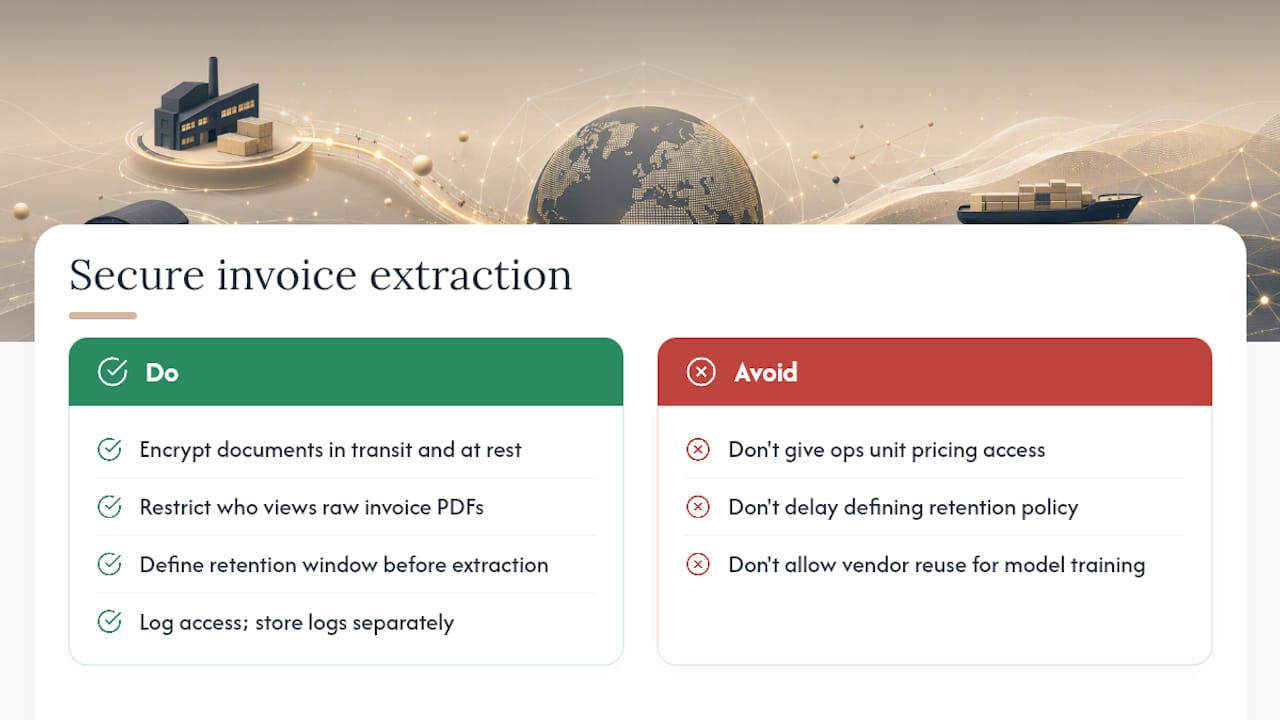
Encrypt documents in transit and at rest, and restrict who inside your operation can view raw invoice PDFs versus who only needs the extracted, validated fields. Not every operations team member needs to see a supplier’s actual unit pricing to process a shipment through customs.
Retention policy needs a clear answer before extraction starts, not after an audit request arrives. Customs authorities can request supporting documentation years after a filing, so documents and their extraction envelopes (the SHA-256 hash, parser version, timestamp) need a retention window that matches your jurisdiction’s audit lookback period, not just your internal record-keeping habit.
Access logging matters more here than in most back-office workflows, because a commercial invoice extraction pipeline touches financial data (declared values, pricing), trade relationships (who ships to whom), and compliance data (HS codes, country of origin) simultaneously. Log who viewed or exported extracted data, and separate that access log from your general system logs so a security review doesn’t require sifting through unrelated activity.
If your extraction vendor processes documents on shared infrastructure, ask directly whether your invoice data trains models used by other customers. That single question separates vendors who treat your commodity mix and pricing as your proprietary information from those who don’t.
How Do You Train a Model for Commercial Invoice Extraction?
Generic OCR and off-the-shelf document models get you partway. They don’t know that your top three suppliers put the country of origin in a footer instead of the line-item table, or that one customer’s invoices list HS codes in a column labeled in French.
Fine-tuning starts with a labeled corpus of your own invoices, not a generic public dataset. Pull 100 to 200 real invoices spanning your busiest suppliers and trade lanes, and label every field you extract: header fields, line items, and the trickier cases like HS codes buried in item descriptions rather than a dedicated column. Experts recommend searching headers, footers, and item descriptions for HS codes and country of origin rather than assuming they sit only in the primary table, and that assumption should shape how you label training data too.

Split that corpus by template, not randomly. A model that’s seen 190 examples of Supplier A’s invoice and 10 of Supplier B’s will extract Supplier A’s fields well and guess badly on Supplier B’s, even if the overall sample size looks respectable.
Track accuracy per field, not just an overall score. An 98% accurate model that consistently misreads country of origin is more dangerous to a customs filing than a 90% accurate model that flags its own weak fields for review. Retrain on a rolling basis as new supplier templates appear rather than treating the model as finished after initial deployment. Trade documentation changes every time a supplier switches ERP systems or a new lane opens, and a model trained once in 2026 will drift as those templates shift.
Can Invoice Extraction Scale as Volume and Formats Grow?
A pipeline that handles 200 invoices a month from five suppliers looks nothing like one built for 20,000 invoices a month from 400 suppliers across a dozen countries. The gap isn’t raw throughput. It’s template diversity, language variation, and the exception-handling capacity to keep pace without adding headcount at the same rate as volume.
Project-level schemas help here directly. Keeping invoice extraction, packing list extraction, and B/L extraction as separate parsing projects, each with its own focused field list, means a new supplier template only requires updating one project’s rules rather than retesting an entire monolithic parser. That modularity is what keeps onboarding time from growing linearly with supplier count.
Exception rate is the metric that reveals whether scaling is working. If exception rate holds steady or drops as volume climbs, the system is scaling well. If it climbs alongside volume, new templates are outpacing the system’s ability to handle them, and that’s a signal to invest in broader Document AI coverage rather than more point-fixes for individual suppliers.
Seasonal volume spikes deserve their own plan. A forwarder that triples volume during peak shipping season needs an exception-handling workflow that can absorb a proportional spike in flagged items without a backlog forming, since a queue of unreviewed exceptions during peak season is exactly when a missed customs deadline costs the most.
Author Perspective: What Changes on the Ground
The real shift isn’t speed. It’s where staff time goes. Teams that automate extraction don’t shrink, they reallocate: fewer hours on retyping line items, more hours on the exceptions that actually need judgment, like a supplier who mislabels country of origin every third shipment.
Auditability matters more than most teams realize until a filing gets questioned two years later. A reproducible extraction (same input, same output, every time) turns a stressful audit request into a five-minute lookup.
— Bogdan
Pilot Logentic’s Approach to Commercial Invoice Extraction
An AI agent reads incoming invoice emails, extracts the header and line-item fields, and enters validated data into your TMS rapidly, work that typically takes a human several minutes per document. That speed difference is the entire pitch: less time spent retyping, more time spent on the shipments that actually need a person’s judgment.

A pilot doesn’t require ripping out your existing systems. Connect an intake inbox through email automation, map your three most frequent supplier templates first, and run a 30 to 90 day test measuring exception rate and time per document against your current baseline. From there, extend into customs preparation for entry filing and freight forwarder software for the broader TMS workflow. Start with the inbox that generates the most manual entry today. That’s where the fastest measurable gain shows up.
Sources
- Automating Customs Declaration Data Extraction for Customs Brokers & Freight Forwarders | DocumentIQ
- Commercial Invoice PDF Extraction
- 5 Steps to Automate Customs Docs for Freight Forwarders in 2026
- Global Customs & Trade Forum blog (invoice extraction demo)
- Customs Declaration Data Extraction: Automating Import and Export Documentation · Subhajit Bhar
FAQ
What Is Commercial Invoice Extraction?
Commercial invoice extraction is the process of pulling header and line-item data (invoice number, parties, currency, HS codes, quantities, values) from a PDF or scanned invoice into a structured format a TMS or customs system can use directly. It replaces manual retyping with validated, structured output ready for import.
How Accurate Does Invoice Extraction Need to Be for Customs Filing?
Accuracy targets should be set per field, since a misread HS code or country of origin carries more compliance risk than a minor formatting error elsewhere. Low-confidence or anomalous fields should escalate to human review rather than get filed automatically, following a fail-loudly approach.
Can Extraction Handle Scanned Invoices, Not Just Digital PDFs?
Yes, but scanned invoices need OCR preprocessing first, since they lack an embedded text layer that digital PDFs provide. Detecting the absence of a text layer before extraction runs is a standard check in any reliable pipeline.
How Does Logentic Handle Invoice Extraction Differently?
Logentic’s AI agent, Alex, reads invoice emails and enters extracted data into your TMS in about eight seconds, cutting a process that typically takes several minutes down to nearly real time. Current pricing details are available directly on the Logentic site.
What KPIs Should You Track During an Extraction Pilot?
Track time per document, exception rate, and the percentage of invoices processed fully without human intervention. A short pilot focused on your most error-prone suppliers tends to surface the clearest improvement in these numbers fastest.
Recommended
Want to see how Logentic automates this work?
Book a call →